What is SEO and how does it work
SEO (search engine optimization) is work that helps Google understand your site and helps people find it and decide to visit. This guide explains how search works, what you can influence, what Google forbids and how to check your own results in Search Console.
✓ Verified against Google documentation · 4 October 2026
What is SEO in plain words
SEO (search engine optimization) is work that helps a search engine understand your site and helps people find it in the results and decide whether to visit. That is how Google itself describes SEO in its starter guide: SEO starter guide.
SEO is not advertising and it is not a bag of tricks. Ads are paid placements next to the results. SEO works on the ordinary results: you improve the site, and Google decides whether to show it. Getting into results costs nothing, but nothing is guaranteed: Google does not promise to crawl, index or show any particular page, even one that follows the Search Essentials.
How search works: three stages
Google describes Search as three stages, and not every page makes it through all three (How Google Search works):
- Crawling. Automated programs called crawlers find pages by following links and download their text, images and video.
- Indexing. Google analyzes the page and stores information about it in the index, a very large database.
- Serving results. When someone searches, Google picks what it considers relevant from the index and shows links. The searcher chooses a result, and that choice is a click.
For a page to be eligible for the index at all, three minimal conditions apply (technical requirements): Googlebot is not blocked, the page works and returns HTTP 200, and it has indexable content. To see whether Google already knows your site, search for site:yourdomain.com; if results appear, you are in the index.
What decides where you appear
There is no single formula. Google says its automated systems use many different factors to find relevant pages and prioritize the ones that seem most helpful (people-first content). The honest answer to “how do I get to the top” is therefore: make the page that answers the query better than the others, and make sure Google can find and understand it.
In practice the work is split into four areas. This split is common in the industry; Google has no official classification:
- Technical health: the page is reachable by the crawler, returns the right status codes and has a clear address.
- Content: pages that answer real questions and are written for people, not for search engines.
- Structure and links: clear navigation and links between pages that a crawler and a person can follow.
- Reputation: mentions and links from other sites, which appear when your material is worth sharing.
What SEO is not: white hat and black hat
Google’s spam policies name practices that try to deceive ranking as violations (spam policies). The three most common:
- repeating a phrase until it sounds unnatural (keyword stuffing);
- buying or automatically creating links to gain positions (link spam);
- publishing many pages mainly to manipulate rankings (scaled content abuse).
Such practices are called “black hat”; work that stays within the rules is “white hat”. Google warns that violations can lead to a negative adjustment of a site’s presence in results or even removal from the index.
How long SEO takes
Google answers carefully: some changes take effect within hours, others take several months, and usually it makes sense to wait a few weeks before judging the effect. Not every change produces a noticeable result. This is why you compare equal periods rather than single days.
Do you need an SEO specialist
Part of the work you can do yourself; that is what the starter guide is for. A specialist helps when you lack time or experience. Google advises caution (Do you need an SEO?): beware of anyone who guarantees rankings, claims a “special relationship” with Google or advertises “priority submit”. You remain responsible for what a hired company does on your site.
Where to start: five steps
- Connect Search Console. It is a free Google service; you do not need it to be included in results, but it shows your own impressions, clicks and indexing problems (About Search Console).
- Check that the site is indexed with
site:yourdomain.com. - Check that important pages are open to the crawler: not blocked and returning HTTP 200.
- Open the Performance report and see which queries already show your site.
- Improve one page for people: answer the question more fully, fix the title, and write down the date of the change.
How to tell whether SEO works: four numbers
Search Console reports four numbers (impressions, position and clicks):
- Impressionswas the link seen?
- How many times a link to your property appeared in Google results.
- Clickswas it chosen?
- How many times a user went from Google to your property. Not the same thing as an Analytics session.
- CTRhow often?
- Clicks divided by impressions.
- Average positionwhere?
- The average place of the topmost result for the property or row; 1 is the top. Not a fixed place for every user.
The property total and the page rows are counted differently (how Performance data is counted), so rows may not add up to the total.
A worked example
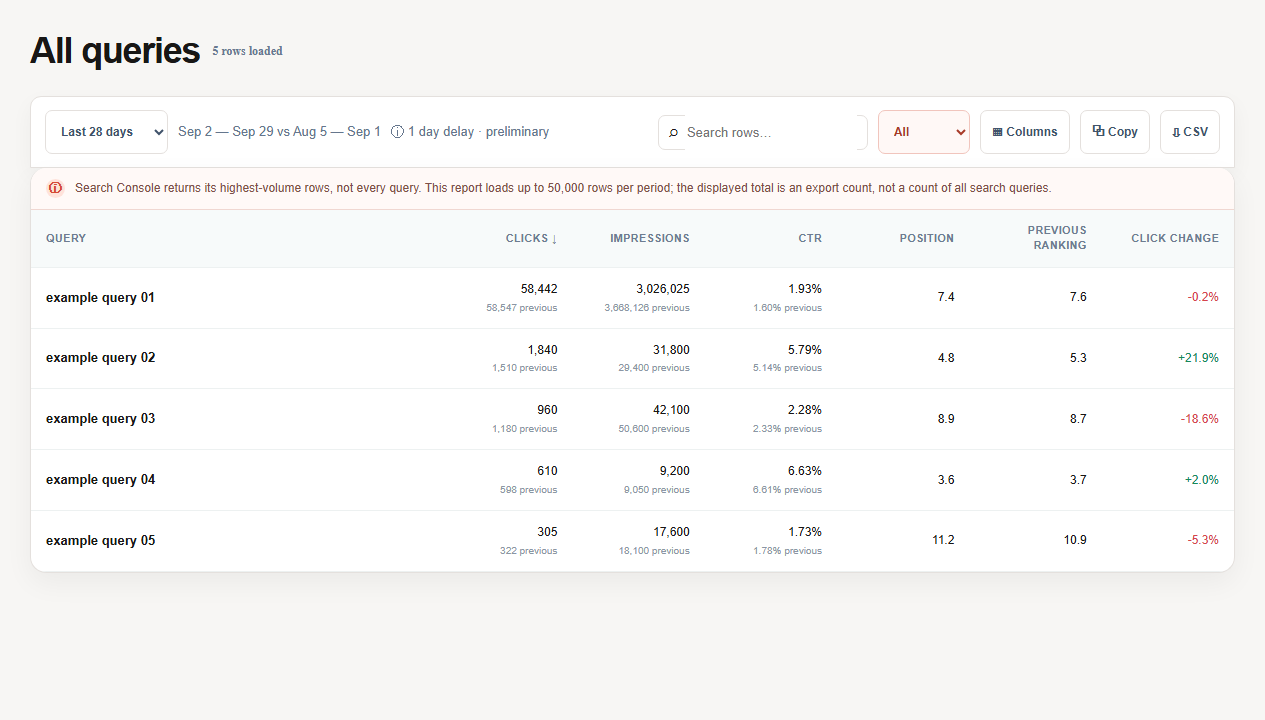
Clicks over 28 days: 58,442 against 58,547 in the previous 28 days. Impressions: 3,026,025 against 3,668,126.
| Now | Before | Change | |
|---|---|---|---|
| Clicks | 58,442 | 58,547 | −0.2% |
| Impressions | 3,026,025 | 3,668,126 | −17.5% |
| CTR | 1.93% | 1.60% | rose |
CTR now = 58,442 ÷ 3,026,025 = 1.93% · CTR before = 58,547 ÷ 3,668,126 = 1.60%
Clicks barely moved while impressions fell 17.5%. CTR rose only because there were noticeably fewer impressions. This is neither a “CTR win” nor a “traffic collapse”: we do not yet know which queries lost impressions.
| Evidence | What it supports | What it does not prove |
|---|---|---|
| Clicks −0.2% | Search visits were nearly stable | That the same queries and pages produced them |
| Impressions −17.5% | Visibility or demand shrank | That the cause is a ranking loss, an indexing problem or seasonality |
| CTR 1.60% → 1.93% | Clicks fell less than impressions | That the title or snippet improved |
Decision: do not rewrite anything yet. Keep both periods and find the rows that lost impressions. The note for this example reads:
- Observation: clicks −0.2%, impressions −17.5%, CTR 1.60% → 1.93%.
- Where: not known yet — open Queries and Pages with the same period comparison.
- Hypothesis: visibility fell for part of the queries; whether demand, indexing or position is the cause is not established.
- Check and stop condition: compare positions and indexing for the same pages and periods; if they did not change, look at demand rather than the page.
SEO questions, answered
Is SEO free?
Getting into Google results costs nothing. What you pay for is time and work, not a place in the results.
Can anyone guarantee first place?
No. Google does not guarantee that it will crawl, index or show a page, and Google advises caution toward anyone who guarantees rankings.
How is SEO different from ads?
Ads are paid placements. SEO improves the site so that it can appear in the ordinary results; the decision to show it stays with Google.
Do I have to use Search Console to appear in Google?
No, registration is not required. Search Console shows your impressions, clicks and indexing problems.
How soon will I see results?
From hours to several months, depending on the change; usually wait a few weeks before judging.
What to read next
Continue with what Google Search Console is, then clicks and impressions, CTR and average position and how indexing works.