How Google indexing works and what the Page indexing statuses mean
Indexing is the stage where Google analyzes a crawled page and stores it so it can be shown in results. This guide explains how to check whether a page is indexed, what each Page indexing status means and when a page that is not indexed is perfectly fine.
✓ Verified against Google documentation · 4 October 2026
What indexing is
Indexing is the stage after crawling: Google analyzes the text, images and video on a page and stores information about it in the Google index, a very large database (How Google Search works). Only indexed pages can be shown in results.
Being indexed is not the same as ranking well, and not every page is indexed. Google does not guarantee that it will crawl, index or show a page. Getting into the index is free, and a page is eligible when three minimal conditions hold (technical requirements): Googlebot is not blocked, the page works and returns HTTP 200, and it has indexable content.
How to check whether a page is indexed
- Search with
site:.site:example.comshows a sample of pages Google knows about, andsite:example.com/page-urlchecks an exact URL (SEO starter guide). - Use URL Inspection. It shows Google’s indexed version of one page, explains why it could or could not be indexed and lets you test the live URL (URL Inspection tool).
- Open the Page indexing report. It lists the pages Google knows about, which are indexed and why others are not. Google says that if your site has fewer than 500 pages you probably do not need this report; the
site:checks are enough (Page indexing report).
What the Page indexing statuses mean
| Status | What it means | What to do |
|---|---|---|
| Crawled – currently not indexed | Google crawled the page but did not index it; it may or may not be indexed later | do not resubmit it for crawling; check that the page is useful and distinct |
| Discovered – currently not indexed | Google found the URL but has not crawled it yet; typically it expected the crawl to overload the site and rescheduled | check server speed and errors in the Crawl Stats report |
| Duplicate without user-selected canonical | the page duplicates another and states no preferred canonical; Google chose another page. This is not an error | if Google chose the wrong URL, set your canonical explicitly |
| Alternate page with proper canonical tag | the page correctly points to an indexed canonical page | nothing |
| Page with redirect | a non-canonical URL that redirects, so it is not indexed; the target may be | check the target URL |
| Not found (404) | the page returned 404; not necessarily a problem if you removed it without a replacement | fix links to it if the page should exist |
| Soft 404 | the page shows a “not found” message but does not return a 404 code | return a real 404, or add content if the page should exist |
| Server error (5xx) | the server returned a 500-level error when Google requested the page | check availability in the Crawl Stats report |
| URL blocked by robots.txt | the page was blocked by your robots.txt | remove the rule if the page should be indexed |
Read the description of each reason in the report before acting: the Source column tells you whether it is something you can fix (Page indexing report).
When a page that is not indexed is fine
Google answers this directly: it is fine for a URL not to be indexed for the right reasons, such as an expected robots.txt rule, a noindex tag, a duplicate URL or a 404 for a page you removed. Google does not index pages blocked by robots.txt or noindex, duplicates, or pages it considers inappropriate to index, for example variations with different filters applied. A new site or page can also simply need time: it can take about a week for Google to start crawling and indexing.
So the goal is not “everything indexed” but “every important page indexed and every exclusion explained”.
How to ask Google to index a page
- A few URLs: use Request indexing in URL Inspection. You must be an owner or full user of the property, and there is a quota (Ask Google to recrawl your URLs).
- Many URLs: submit a sitemap (Sitemaps report).
Crawling can take anywhere from a few days to a few weeks, and requesting a recrawl several times for the same URL will not get it crawled faster. A request does not guarantee that the page will appear in results, immediately or at all.
A method: label twenty important URLs
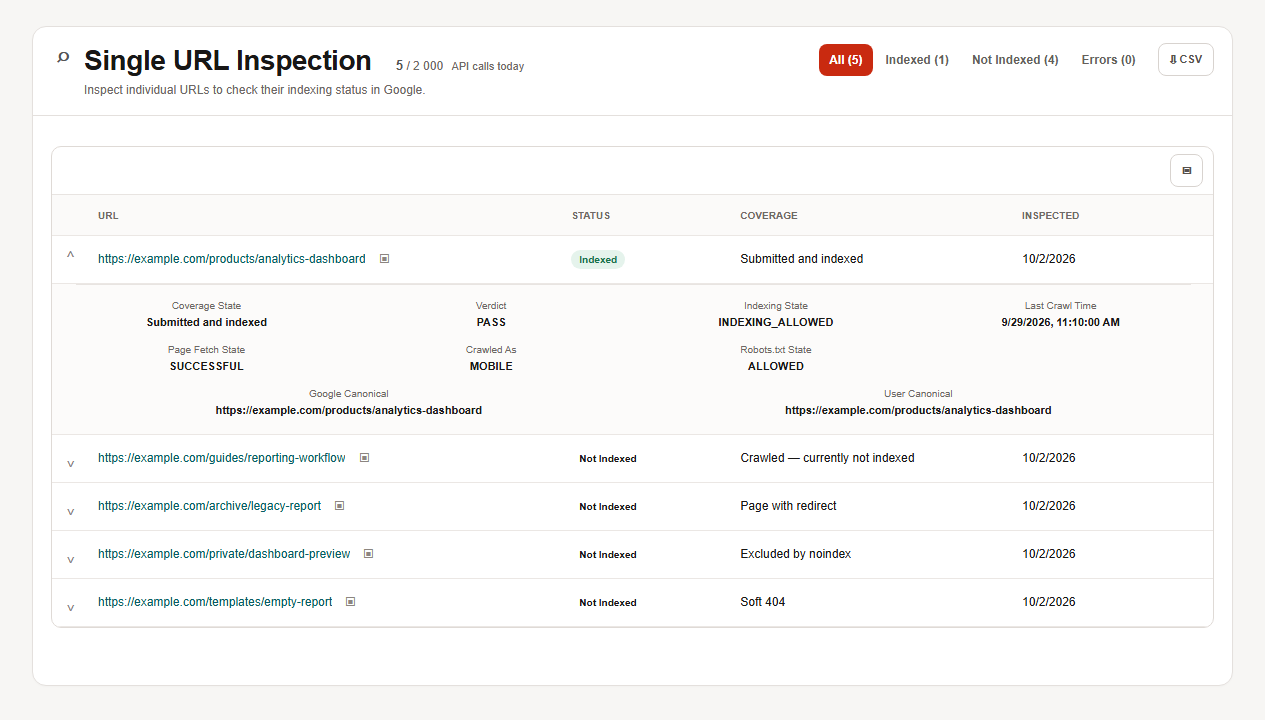
Pick one sitemap or twenty important URLs and label each as indexed, expected exclusion or unexpected exclusion. For every unexpected one record the Search Console reason, what Google says about it and one action. Example:
| URL type | Status | Verdict and next step |
|---|---|---|
| product page | indexed | nothing to do |
| guide | Crawled – currently not indexed | unexpected: check usefulness and uniqueness, do not resubmit |
| old section URL | Page with redirect | expected: link directly to the target |
| private preview | excluded by noindex | expected |
| empty template | Soft 404 | unexpected: return 404 or add content |
The SEOKit indexing report and the technical indexing playbook follow the same logic for larger lists.
Indexing questions, answered
What is indexing in SEO?
The stage where Google analyzes a page and stores information about it in its index so it can be shown in results.
What is the difference between crawling and indexing?
Crawling is finding and downloading a page; indexing is analyzing it and saving it to the index.
Why is my page not indexed?
Open URL Inspection and read the reason: blocked, noindex, duplicate, 404, soft 404, server error, or simply not crawled yet.
What does “Crawled – currently not indexed” mean?
Google crawled the page but did not index it. It may be indexed later, and you do not need to resubmit it.
How long does indexing take?
From a few days to a few weeks; a new site can take about a week to start.
Does requesting indexing guarantee a result?
No. Google says a request does not guarantee inclusion.
What to read next
Turn what you found into small tasks with the Week 1 quick wins playbook, or go back to CTR and average position.