Clicks and impressions in Search Console: the difference
Impressions show that your link could be seen, and clicks show that someone chose it. This guide explains how Google counts each, how the two numbers move together and what that does and does not tell you.
✓ Verified against Google documentation · 4 October 2026
What impressions and clicks are
An impression means a user has seen, or potentially seen, a link to your site in Search. A click means a user went from Google to a page outside Google. Search Console reports both in the Performance report, together with CTR (clicks ÷ impressions) and average position (impressions, position and clicks in Search Console).
They answer different questions. Impressions tell you whether people had a chance to see you; clicks tell you whether they chose you. A fall in clicks is an outcome, not a diagnosis, so the first job is to find which of the two changed.
How Google counts them
| Metric | Counted when | Not counted |
|---|---|---|
| Impression | a link appears in the current page of results, even if it is not scrolled into view, when the user does not need to click to see more results | scrolling away and back, or paging away and back, during one query adds no second impression |
| Impression in a carousel or expanding section | the item is scrolled into view in the carousel, or expanded by a click | items never scrolled into view |
| Click | the user leaves Google Search to a page outside it | links that stay inside Google, and query refinements |
| Repeated click | a different link is clicked, one click per link | clicking the same link again after returning |
The rules differ by result type, so read the help page for the element you care about before drawing conclusions. Only impressions and clicks that eventually lead out of the results page are logged.
Why more impressions is not the goal
Google’s help puts it plainly: aim not simply for more impressions but for meaningful ones, seen by people who will find your information useful. Being seen or clicked by people who quickly leave is not a healthy way to build traffic and loyalty. So a rise in impressions alone is not good news, and a fall is not automatically bad: it may be a drop in irrelevant visibility.
Four ways the two numbers move together
| Impressions | Clicks | First thing to check |
|---|---|---|
| up | up | which queries and pages grew, and whether they matter to the business |
| up | flat or down | position, query intent and the snippet: you were seen more but chosen less |
| down | flat | which rows lost impressions; CTR rises mechanically when only low-value impressions disappear |
| down | down | demand, indexing and position for the affected pages |
The table only tells you where to look; it does not name a cause.
Property or page: why totals differ
If one result element contains several links to your site, impressions and clicks are counted differently depending on grouping (how Performance data is counted). Google’s example: a user sees three results from the same property and clicks each. Grouped by property that is 1 impression, CTR 100% and position 1, the highest place the site held. Grouped by page it is 1 impression for each URL, CTR 33% per URL as Google’s table shows, and the position is averaged over the pages: (1 + 2 + 3) ÷ 3 = 2. This is why chart totals and table rows may not match, and why a filter by page can change the chart.
Search Console also omits some data: the table shows at most 1,000 rows, and anonymized rare queries are left out of the table but included in the chart total (troubleshooting data discrepancies).
Clicks are not sessions
A click in Search Console is not an Analytics session. Analytics measures what happens on your site and, unlike Search Console, tracks only users who have JavaScript enabled; Search Console data is also processed to remove duplicates and arrives with a lag of usually two to three days. Compare the two systems to find where a problem is, not to force the totals to match.
A worked example
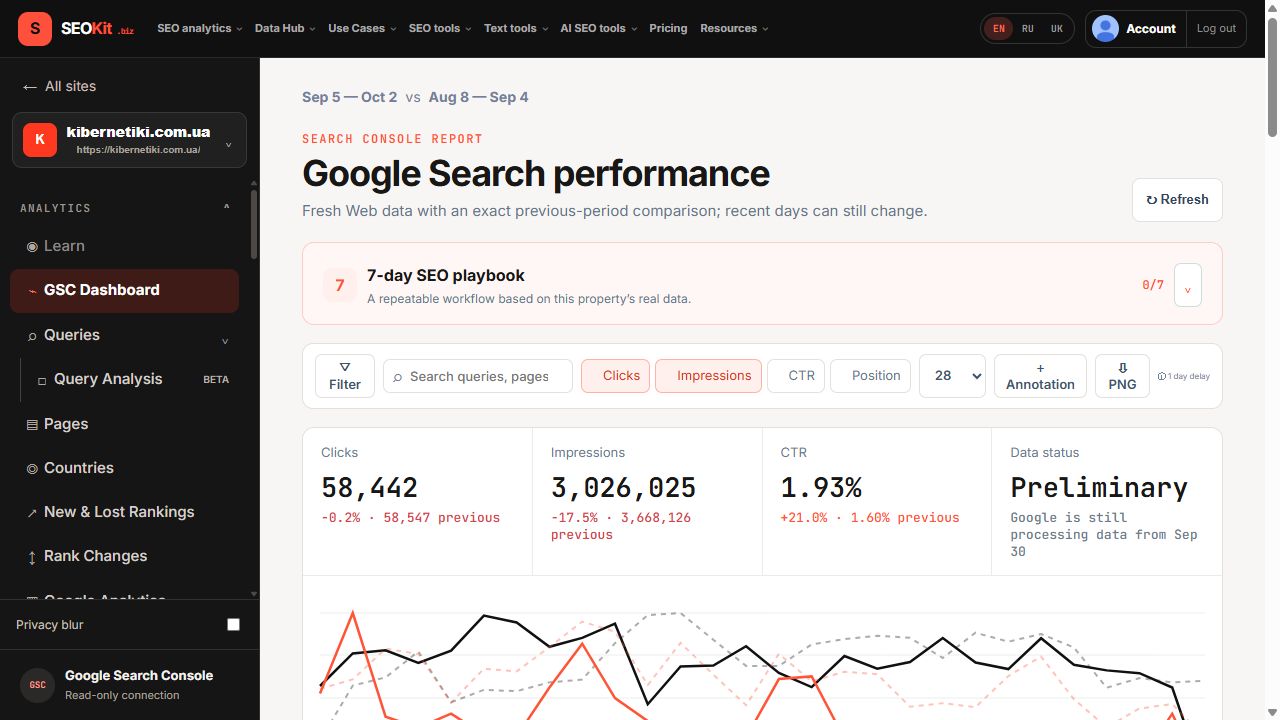
Over 28 days a site had 58,442 clicks against 58,547 in the previous 28 days, and 3,026,025 impressions against 3,668,126. CTR is 58,442 ÷ 3,026,025 = 1.93% now and 58,547 ÷ 3,668,126 = 1.60% before.
Clicks fell 0.2% while impressions fell 17.5%: the third row of the table above. CTR rose only because impressions shrank. The decision is not to rewrite anything yet but to keep both periods and find the rows that lost impressions.
How to check your own data
- Open the Performance report and choose two equal complete periods.
- Write down clicks, impressions, CTR and position for both.
- Locate your case in the four-row table above.
- Split by Queries and Pages without changing period or filters.
- Record the conclusion and what it does not prove.
Clicks and impressions, answered
What is an impression in Google Search Console?
A user has seen, or potentially seen, a link to your site in Search.
What counts as a click?
A click that sends the user from Google Search to a page outside Google.
Why are my impressions high and clicks low?
Check position, query intent and the snippet: the link is seen, but not chosen.
Do clicks in Search Console match Analytics sessions?
No. They are different units measured in different systems.
Why do chart and table totals differ?
Different aggregation, the 1,000-row table limit and anonymized queries.
What to read next
Continue with CTR and average position, or go back to what Search Console is.