What is CTR: formula, average position and how to read them
CTR is the share of impressions that became clicks, and average position is where your link stood on average. Both are averages, so they can hide what really happened. Here is the formula, a worked example and a method for judging your own numbers.
✓ Verified against Google documentation · 4 October 2026
What CTR is
CTR (click-through rate) is the share of impressions that turned into clicks. Search Console defines it as clicks ÷ impressions (impressions, position and clicks). If a link was shown 1,500 times and clicked 30 times, its CTR is 30 ÷ 1,500 = 2%.
CTR describes the choice made after a result was shown. It says nothing by itself about why the result was chosen or skipped, and it does not measure ranking.
How to calculate CTR correctly
The formula is the same for a query, a page or a whole property: take the clicks, divide by the impressions, multiply by 100 to get a percentage. When you combine several rows, add the clicks and add the impressions first, then divide. Never average the percentages of rows with different numbers of impressions.
| Group of queries | Impressions | Position | CTR | Clicks |
|---|---|---|---|---|
| A | 100 | 2.0 | 10.0% | 10 |
| B | 900 | 12.0 | 1.0% | 9 |
(10 + 9) ÷ (100 + 900) × 100 = 1.9% CTR
The simple average of the two percentages would give 5.5%, which is wrong: group B produced 900 of the 1,000 impressions, so the total follows it.
What average position means
Position is a relative ranking: 1 is the topmost place on the results page, 2 the next one and so on. In Search Console it is shown as average position, which averages the position value over all impressions, because a link sits in a different place each time it is seen (what is position).
For a property, the Performance report takes the topmost position of your property in each query and then averages across queries. Example from Google: a property at positions 2, 4 and 6 in query one counts as 2; at 3, 5 and 9 in query two counts as 3; the average is (2 + 3) ÷ 2 = 2.5. A link must get an impression for its position to be recorded, which is why you may see a dash instead of a number.
Grouping matters too: when rows are grouped by page, each page’s own topmost position is used, so chart and table values can differ (how Performance data is counted).
Why the report says 5 and your search shows 8
Google answers this directly: the value in the report is the average position over all searches. For your own search the position can differ because of your search history, location and other variables. Google also advises monitoring changes in position over time, especially sudden ones, together with the absolute value, because a position number can mean different things in different situations.
So a single manual search is not evidence. Use the report across a full period and compare equal periods.
Why one average can mislead
Take the table above. Averaged by impressions the two groups give position (100 × 2 + 900 × 12) ÷ 1,000 = 11.0, and CTR 1.9%. Neither number describes group A, which is excellent (10% at position 2), or group B, which is weak (1% at position 12). A page that “averages position 11” may therefore never behave like an average page.
The useful question is not “is 1.9% good?” but “which comparable group of queries produced the change?” Open the Queries and Pages tabs, keep the search type, country, device and dates fixed, and look for the rows that contribute most of the impressions.
What CTR is good
The Search Console help gives no standard CTR, and a universal percentage is a weak benchmark. CTR usually depends on position, on the intent behind the query, on how well people know your brand and on what else appears on the results page.
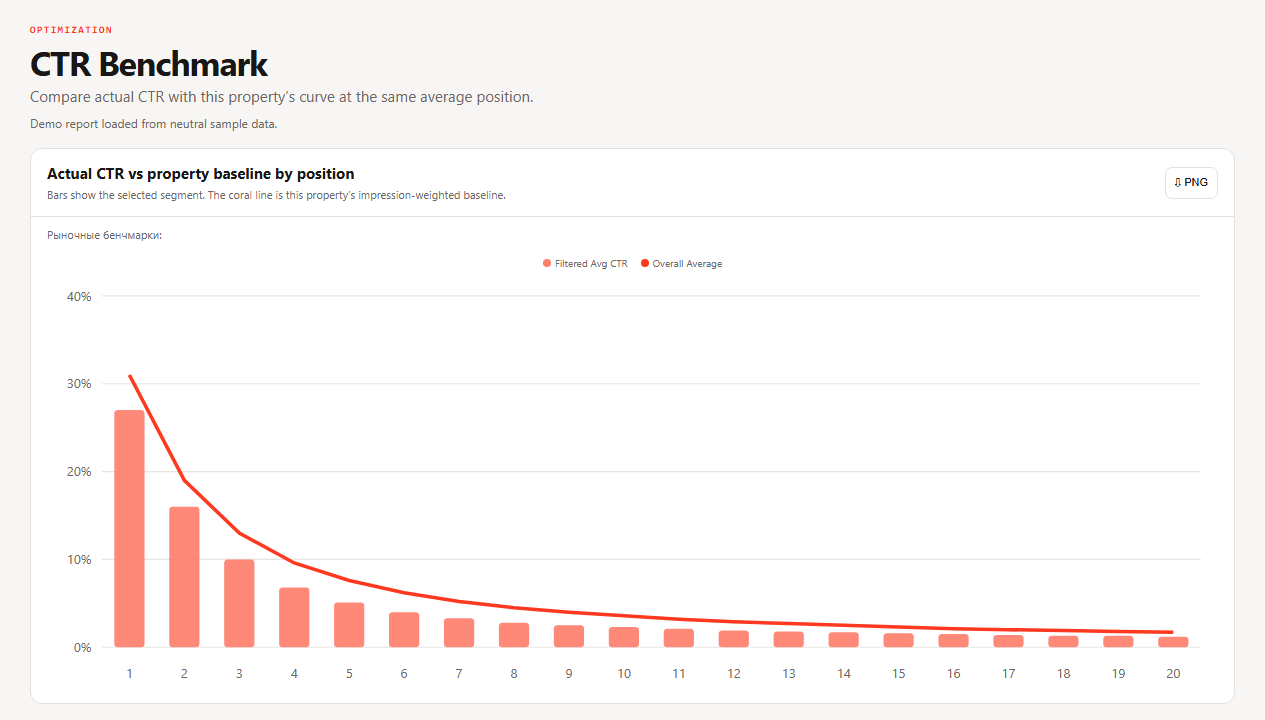
The only benchmark that holds is your own: group rows into position ranges, divide the sum of clicks by the sum of impressions for each range, and compare a query or page with your site’s CTR at a similar position, using the same period, search type, country and device. SEOKit’s CTR Curve builds this baseline from your data. A point below the curve is a reason to look at the query intent and the live results page; it does not prove that the title or description is at fault, and ranges with few impressions should not be used for conclusions.
What to do when CTR is low
- Check position first. At positions far down the page CTR is low almost by definition; move the ranking first.
- Check the query intent and the live results page: does your page answer what people want?
- Review the title and snippet. Google builds the title link from several sources, including the
<title>element and headings (SEO starter guide). - Change one thing and write down the date.
- Compare the next full period with the same filters. If impressions are too few, record “insufficient evidence” and change nothing.
CTR questions, answered
What does CTR mean?
Click-through rate: clicks divided by impressions, shown as a percentage.
What is the CTR formula?
CTR = clicks ÷ impressions × 100. For several rows, add clicks and impressions first.
What is a good CTR?
There is no universal number. Compare with your own site at a similar position.
What does average position mean in Search Console?
The topmost position of your link, averaged over impressions and queries; 1 is the top.
Why does the position in the report differ from my search?
The report shows an average over all searches, while your result depends on your history and location.
What to read next
Go back to clicks and impressions, continue with how indexing works, or use the CTR recovery playbook when you have found a real gap.