SEOKit · Observed on
How to check Google indexing in bulk for 20 URLs
Compare Google Search Console URL Inspection and the SEOKit bulk index checker on 20 URLs. See the timing, screenshots and indexing status for each page.
How to check Google indexing for a list of URLs

Recorded on 20 November. URL A appears twice in the list. SEOKit checks A and B once each. The timing table below covers a separate run of 20 URLs.
Bulk indexing check results
- Google Search Console
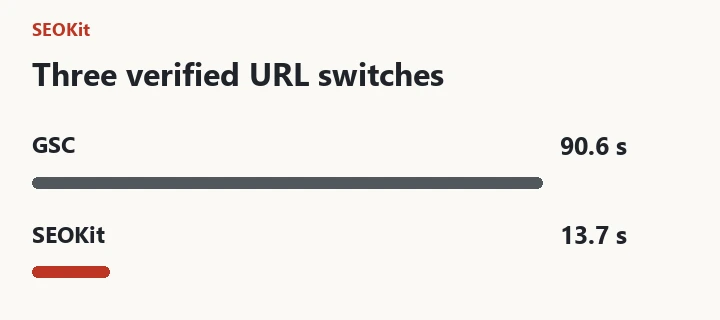
- 109.3 s
- SEOKit
- 51.2 s
- Difference in this run
- 58.1 s
Both methods returned the same indexing verdict for all 20 URLs. Nine were in the Google index and 11 were outside it. SEOKit grouped the latter for further review.
Bulk Google index checker vs manual URL Inspection on 20 URLs
The sample consisted of 20 public URLs from one verified property. In Google Search Console we entered the addresses individually. In SEOKit we submitted the same list in one batch. Both methods read the indexing status saved by Google. Each method was timed once using browser automation.
Time to collect all 20 indexing statuses
| Measured step | GSC | SEOKit |
|---|---|---|
| Enter and run | 49.6 s | 0.8 s |
| Wait for results | 59.7 s | 50.4 s |
| Total | 1 min 49.3 s | 51.2 s |
The timed interval covered input, launch and waiting for the result. The URL list was prepared in advance. Pauses between sets of checks and the additional 21.7 seconds spent verifying that GSC cards had settled were excluded. Most of the observed difference came from input and launch.

Indexing status for all 20 URLs
The indexing verdict agreed for 20 of 20 URLs. The detailed labels agreed for 14 of 20. For the other six, Google reported either a discovered URL outside the index or a URL unknown to Google.
| URL | GSC | SEOKit |
|---|---|---|
| 01 | Indexed | Indexed |
| 02 | Indexed | Indexed |
| 03Reason differs | Discovered, not indexed | Unknown to Google |
| 04 | Discovered, not indexed | Discovered, not indexed |
| 05Reason differs | Unknown to Google | Discovered, not indexed |
| 06 | Discovered, not indexed | Discovered, not indexed |
| 07 | Indexed | Indexed |
| 08 | Unknown to Google | Unknown to Google |
| 09Reason differs | Unknown to Google | Discovered, not indexed |
| 10Reason differs | Discovered, not indexed | Unknown to Google |
| 11Reason differs | Unknown to Google | Discovered, not indexed |
| 12 | Indexed | Indexed |
| 13 | Indexed | Indexed |
| 14 | Indexed | Indexed |
| 15 | Discovered, not indexed | Discovered, not indexed |
| 16 | Indexed | Indexed |
| 17Reason differs | Unknown to Google | Discovered, not indexed |
| 18 | Indexed | Indexed |
| 19 | Unknown to Google | Unknown to Google |
| 20 | Indexed | Indexed |
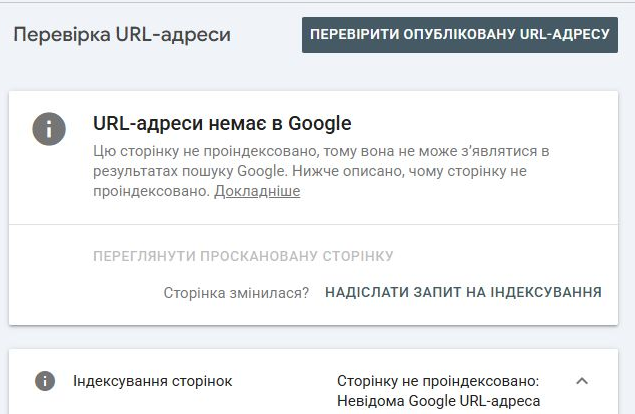
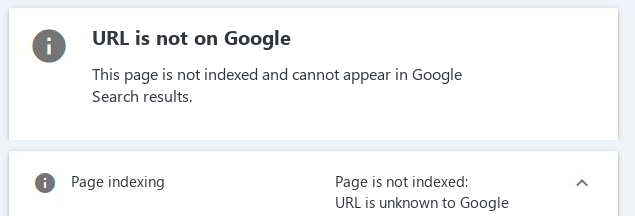
Google Search Console URL Inspection for the fourth address in the list
The 20 addresses are numbered to keep them anonymous. Both screenshots below refer to row 04 in the comparison table.
Google Search Console
URL 04 was outside the index. When this screenshot was taken, Google showed “URL is unknown to Google”.
SEOKit · GSC Workspace
The saved result was “Discovered – currently not indexed”. SEOKit added URL 04 to the review queue and suggested checking the HTTP response, robots rules and canonical URL.

The screenshots were taken at different points. The table uses the timed run, when both methods reported “Discovered – currently not indexed” for URL 04. The screenshots agree that the URL was outside the index. The cause of the difference in the reason remains undetermined.
Limitations of the indexing comparison
The timings apply to a single sample and include browser automation overhead. The measurement covered retrieval of saved Google statuses. Live URL testing, indexing requests, and subsequent changes to indexing were outside the scope of the comparison.
Step-by-step URL inspection
-
Open URL Inspection
Select your property in GSC Workspace. In the sidebar, open Indexing and click URL Inspection.

Indexing → URL Inspection -
Paste the list and start the check
Under Bulk URL Inspection, select Paste URLs. Enter one full URL from the selected property per line, then click Inspect URLs. If you select Run in this tab, keep it open until the check finishes.

A appears on lines one and three. Check that the count under the box matches the number of distinct pages you intend to inspect. -
Check how many inspections returned a result
After the progress bar fills, compare the processed count with the unique URLs you submitted. This run returned two results with zero errors. Open the history to see which page Google had indexed. If a request failed, review that URL separately.
-
Use the status and coverage to pick the next URL to investigate
Open the Single URL Inspection history below the form. Find your addresses and check the date, since the table also contains previous checks. Read Status and Coverage together. These are Google’s saved results for each URL.

Coverage on 20 November: Google did not know URL B. URL A had been submitted and indexed. Start with URL B. If it belongs in search, follow an internal link to the page and check that its exact address appears in the submitted sitemap. Then open URL B in Search Console for an individual inspection.
When to use bulk indexing checks
To check if a page is indexed, open its individual report in GSC. After a release or migration, a bulk index checker can group URLs that need review. If the reason affects the next step, review the individual report. For repeated comparisons or handover, the CSV export covers up to 500 recent URL inspections. Keep the rows for your sample.
The account we used had no active paid plan. Workspace plans differ in limits for properties, stored history, and collaborators.