How to improve organic CTR: titles, snippets and your own baseline
Organic CTR rises when the result promises what the page delivers, but there is no standard CTR to chase. This playbook builds a baseline from your own site, sizes the click gap for one query–page pair, explains what Google documents about snippets and runs a single bounded test.
✓ Verified against Google documentation · 4 October 2026
What organic CTR and “expected CTR” are
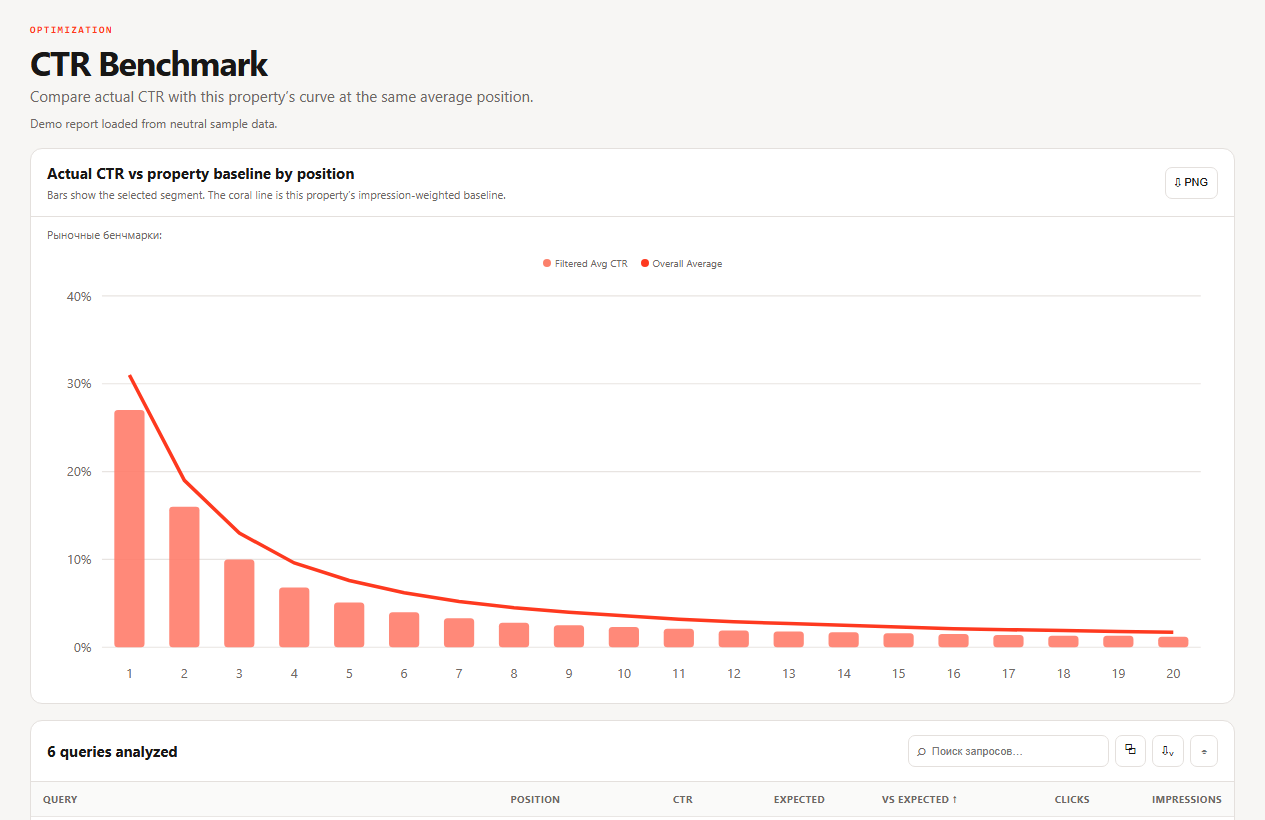
Organic CTR is the share of impressions of your result that became clicks: clicks ÷ impressions (Performance report). There is no standard CTR you can compare yourself with. CTR changes with position, query intent, brand, device, country and what else is on the results page, so the only benchmark that holds is your own: the CTR this site usually gets at a similar position.
That is what “expected CTR” means here: a local, descriptive baseline built from your own rows, not a Google threshold and not a promise. A page below it is a candidate for a test, not proof of a problem.
Four gates before you edit
A negative gap becomes a test candidate only after these controls.
- Material sample. The pair has enough impressions for this property and the gap is large enough to matter. No fixed threshold is a Google rule.
- Like for like. Search type, country, device and complete date windows are held constant (advanced filtering and comparison).
- Stable intent and position. The query still belongs to the page, and position or query mix did not shift materially.
- Live result. Inspect the actual result and the features around it. Google can build different snippets for different queries.
What Google shows and what you write
The snippet is built by Google. It uses page content and meta descriptions to create snippets, and it may use the meta description when that describes the page more accurately than text taken from the page (control your snippets). What the documentation lets you rely on:
- Write a unique, descriptive meta description for each important page. A good one is a short, accurate summary, like a pitch that shows the page is what the searcher wants. Avoid lists of keywords.
- There is no length limit. The snippet is truncated as needed, typically to fit the device width, so do not force a character count.
- For very large sites, programmatically generated descriptions are appropriate and encouraged when they are human-readable and diverse.
- You can control snippets with
nosnippet,max-snippetanddata-nosnippet. - If Google keeps choosing body text, make the opening of the page a clear summary that could stand alone as a snippet. This is editorial practice, not a Google rule.
The title link matters as much as the description: see the title tags playbook and Google’s guidance on title links.
Size the click gap before changing the snippet
A neutral query–page pair, Web search, one country and device, a complete 90-day window. The property curve expects 7.6% near average position 5.2; the pair received 44 clicks from 2,100 impressions.
| Metric | Observed | Baseline | Difference |
|---|---|---|---|
| CTR | 2.1% | 7.6% | −5.5 pp |
| Clicks | 44 | 160 at baseline | −116 |
| Average position | 5.2 | same bucket | controlled |
Actual CTR = 44 ÷ 2,100 × 100 = 2.10%
Baseline clicks = 2,100 × 7.6% = 159.6 ≈ 160; observed gap = 160 − 44 = 116
The 116-click gap sizes the current deviation. It is not a forecast: the curve is descriptive, average position hides variation and the snippet may not be the cause.
The eight-step CTR test
Change one primary promise and keep the filters used to nominate it.
- Load the property curve. Open CTR Benchmark for a complete window with the search type explicit.
- Shortlist negative gaps. Sort actual minus expected CTR ascending, then prioritize material impression volume.
- Open one query–page pair. Verify the exact query, the canonical page, device, country and search appearance (dimensions and data groupings).
- Check comparable history. Confirm the query mix and average position are stable across equal windows.
- Inspect the live result. Results vary by location and personalization; record the title link, the snippet and the nearby features as context.
- Choose one truthful change. Make the title or summary specific to the page. Do not force a character count or stuff query variants.
- Publish and annotate. Save the old and new copy, URL, filters, launch date, the 2.10% baseline and the hypothesis.
- Measure the same pair. After enough new impressions compare equal complete windows. Accept, reject or extend the test; Google says some changes show within hours and others take months (SEO starter guide).
Match the action to the evidence
| Action | When |
|---|---|
| Rewrite the title promise | the title link is vague or misaligned while the page fulfils the query |
| Improve the description or opening summary | the result lacks a useful page-specific summary; Google may still choose page content |
| Fix page–intent alignment | the snippet is accurate but the page and query relationship is weak; a wording change alone is not enough |
| Leave unchanged | the sample is thin, the gap is explained by the results-page mix or the current result already represents the page well |
What the benchmark cannot prove
- No universal expected CTR. The curve describes this property and period; it is not a ranking threshold.
- Average position compresses variation. It is the topmost result averaged over impressions and can mix positions, devices, countries and layouts.
- Snippets depend on the query. Google may use the page text instead of your meta description.
- No guaranteed recovery. A negative gap does not isolate the cause or promise that the whole gap can be recovered. Anonymized queries and the 1,000-row limit also mean rows are not every query (common Performance tasks).
The test brief
For one row save: the query–page filters, actual and expected CTR, the 116-click descriptive gap, the position and query-mix checks, the observed result, one truthful change, the review rule and the evidence that would reject the hypothesis. If impressions are too few on the review date, record “insufficient evidence” and change nothing.
Organic CTR, answered
How do I improve organic CTR?
Find pairs whose CTR is below your own CTR at a similar position, check intent and the live result, then test one truthful change to the title or summary.
What is a good CTR?
There is no universal number; compare with your own site at a similar position (see CTR and average position).
How long should a meta description be?
Google documents no limit. It truncates the snippet as needed, typically to fit the device width.
Does Google always use my meta description?
No. It uses page content and meta descriptions and may choose the meta description when it is more accurate.
How soon will CTR change?
From hours to several months; compare equal complete windows for the same pair.
What to read next
If a performance problem turns out to be a crawl or index problem, continue with the technical indexing playbook, or go back to cannibalization.