SEOKit · Observed on
How to choose a page to target the top 10
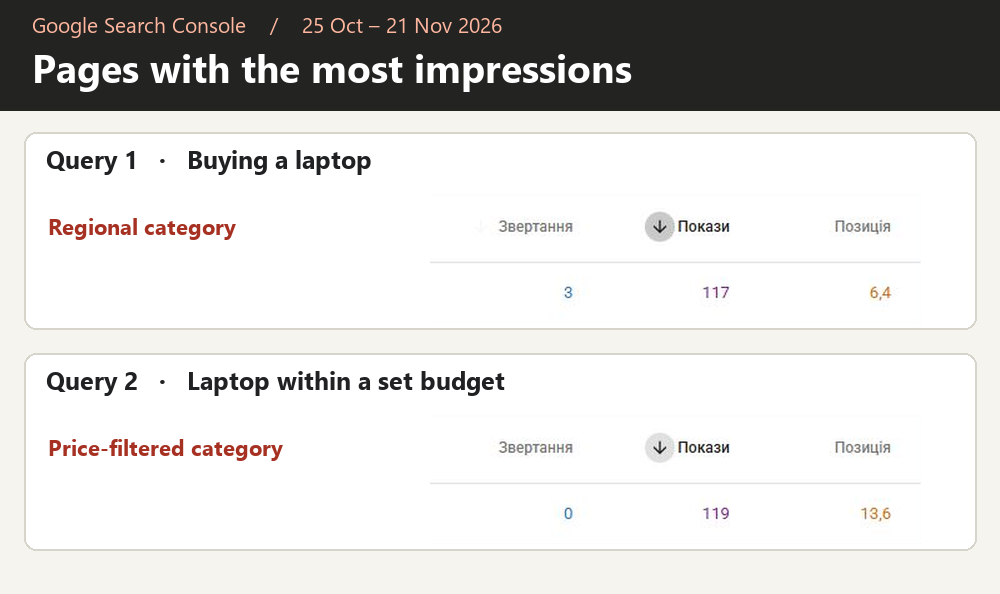
One query led to a regional category already averaging position 6.4. A budget query led to a page with 119 impressions and no clicks. Both tools led to the same page. Follow the search from a query to its URL in each open report.
The page we would review first
Start with the price-filtered laptop page. For a search specifying a budget it appeared 119 times, averaged position 13.6 and received no clicks. There is a concrete check to make: open the selection and see whether the shopper can buy a laptop at the price they asked for.
Why start with a query? The category URL tells us where someone lands. The query tells us whether they want the full range or a laptop within a budget. We used Web Search, all countries and devices, from 25 October to 21 November 2026. Both workflows used the same product family and the same rule: sort by impressions and find the first nonbranded query with an explicit budget, zero clicks and an average position from 11 to 20. The phrases and addresses below have consistent anonymous labels.
How to find the landing page in Google Search Console
- Open Performance → Search results. Set the date range and add a query filter containing the product-family term. Enable clicks, impressions and average position.
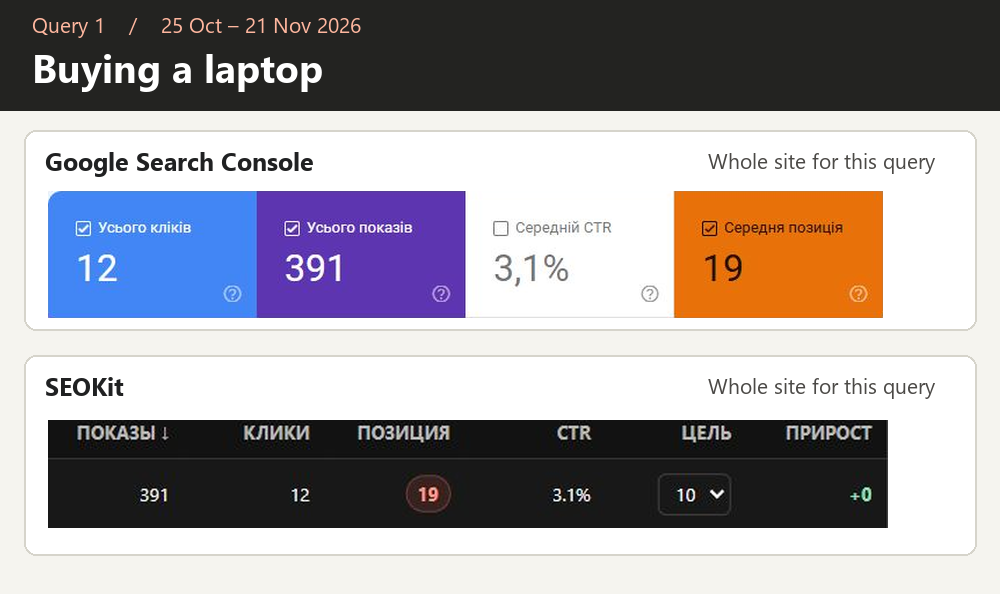
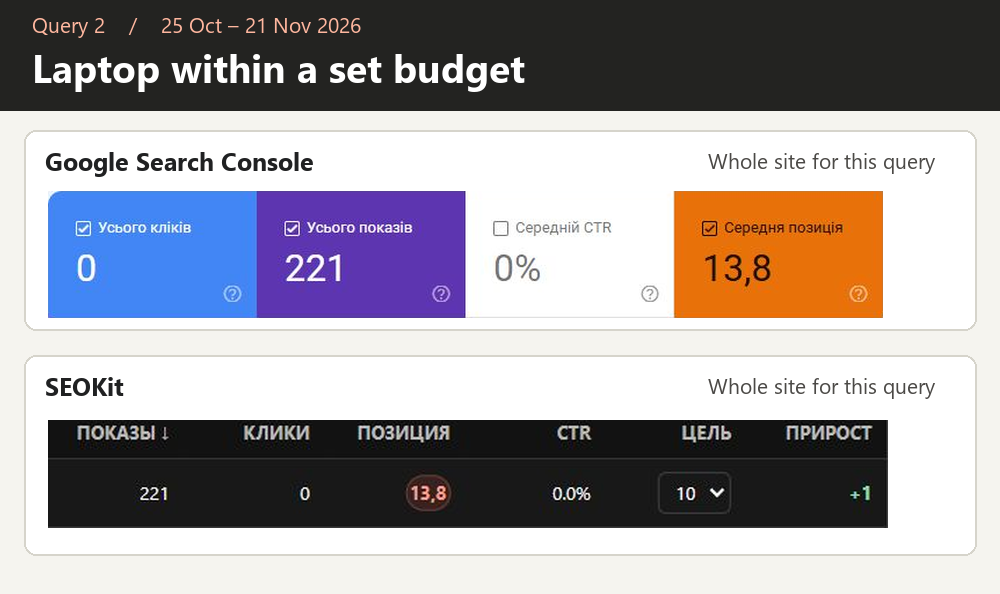
- On Queries, sort impressions from highest to lowest. The broad purchase query had 12 clicks. The budget query met the rule: 221 impressions, zero clicks, position 13.8. Select that exact query.
- Open Pages with the exact query still selected. Sort by impressions again. The first address was the price-filtered category. Here the 119 impressions belong to this URL alone.
How to find the same page in SEOKit
- Open GSC Workspace → Page Poaching Opportunities for the same site and dates. Select the 10–20 position range and enter the product-family term in the query search. This left 432 rows.
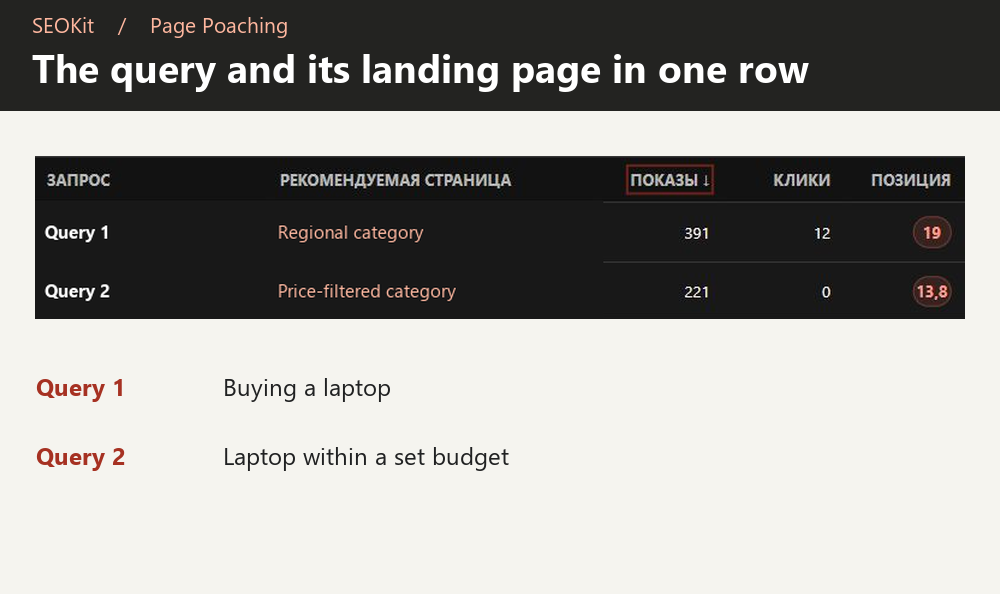
- Read the table in descending impression order. Apply the same 11–20 rule and choose the budget query. Its row shows 221 impressions, zero clicks and position 13.8. Read the Recommended page cell in that row. It links directly to the price-filtered selection.
Cross-checking the same figures
These screenshots show whole-site results for the same exact query in both products. The page-specific metrics from the Pages tab appear separately above.
Query 1 · Buying a laptop
Query 2 · Laptop within a set budget
Follow the selection in the two reports

Four excerpts show the reporting period, position range, recommended URLs and the independent check in GSC.
Time to identify the same landing page
We timed three automated browser runs. At the start, both reports were open for the same dates and product family. GSC started on Queries sorted by clicks, SEOKit on its full position range with impressions already sorted. We started the clock before sorting or selecting the range, and stopped after reading the full URL for the first qualifying query. We checked the returned address in every run.
| Run | GSC | SEOKit |
|---|---|---|
| 1 | 8.24 | 0.48 |
| 2 | 7.38 | 0.45 |
| 3 | 7.74 | 0.45 |
| Median | 7.74 | 0.45 |
The stopwatch covered navigation in prepared reports. In a separate first-load run, reading two candidates in SEOKit took 3 min 16 s including the wait and a retry. Allow for collection on first use. The analyst’s review of the page and any subsequent ranking change were outside the timing.
Where SEOKit saved time and what to check on the page
Both paths led to the same URL and the query figures matched. SEOKit saved a median of about seven seconds on this lookup because the suggested URL was already beside the query. In GSC we opened the query, switched to Pages and sorted the URLs. Keep GSC Pages for the next question: how often did that particular URL appear?
The broad query’s regional page already averaged position 6.4. The budget page averaged 13.6 and earned no clicks. Review the price cap, in-stock models and links that promise that price. If you find and fix a mismatch, record the date and compare the same query and page over equal periods.
Find a page to review on your site →