Striking-distance keywords: how to find them in Search Console
Striking-distance keywords are queries where a page already appears close to page one. This playbook shows how to shortlist them, check demand, fit and page ownership, size an observed click gap and write one test, without promising a ranking or an uplift.
✓ Verified against Google documentation · 4 October 2026
What striking-distance keywords are
“Striking distance” is a workflow label, not a Google metric. Teams use it for queries close enough to page one to be worth inspecting, usually somewhere in positions 4–20. A position band is a fair first filter, but average position is the topmost result averaged across impressions (how impressions, clicks and position are counted), so it does not prove that a query is easy to improve, valuable or stable.
Four gates before you edit a page
Google’s own advice is not to focus too much on absolute position: impressions and clicks are ultimately the measure of success, and small position changes can recover without intervention (debugging Search traffic drops). So a row becomes an opportunity only when four checks survive. The thresholds are editorial choices for your property, not Google rules.
- Demand. Enough impressions in a complete period to be worth inspecting.
- Fit. The query intent belongs to this page and supports a real site goal.
- Ownership. One intended URL receives the query; competing pages are understood first.
- Stability. The pattern survives an equal-period comparison with the same filters.
How to find them: six steps
Keep search type, country, device and date logic the same throughout, exclude preliminary days and compare complete equal periods (advanced filtering and comparison).
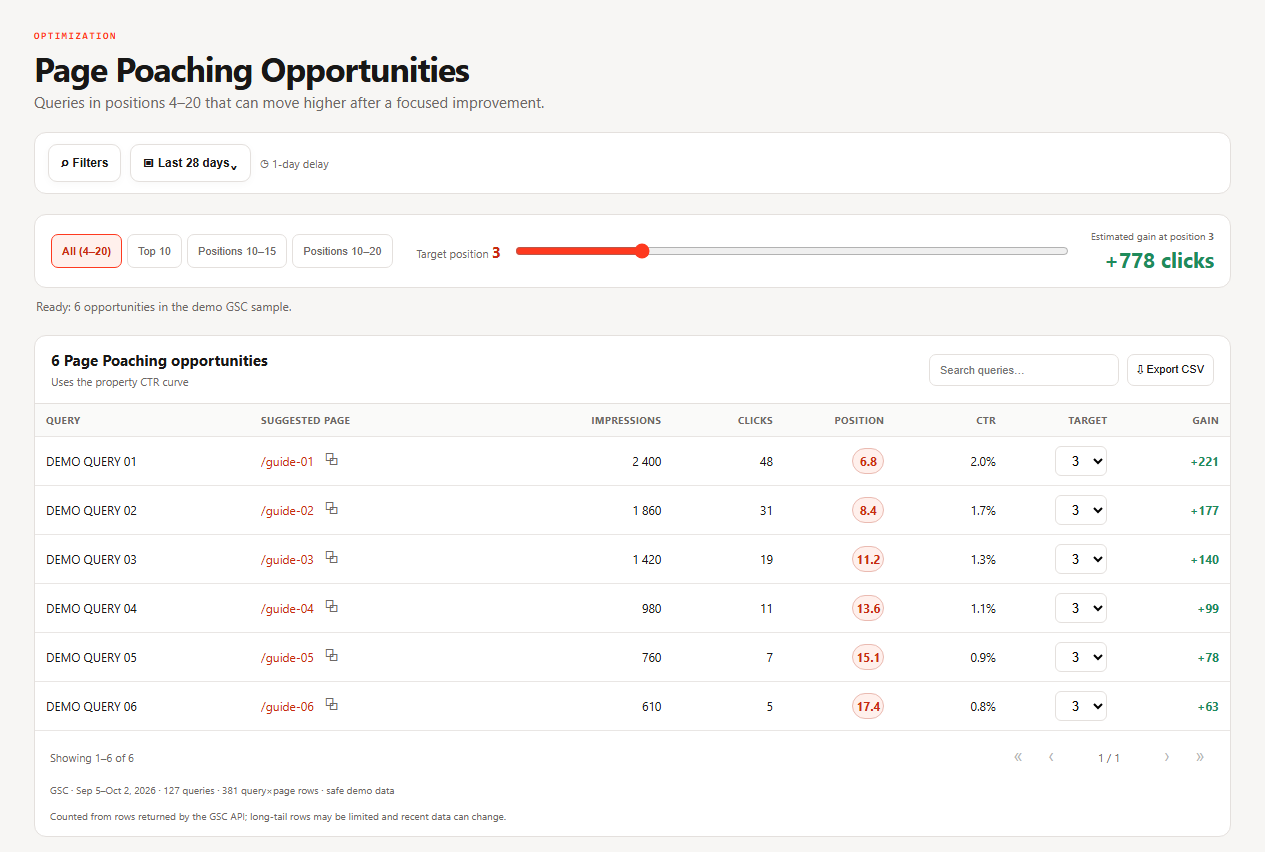
- Create the discovery view. Open Page Poaching and start with a broad band such as positions 4–20. Adjust the band and the impression floor to the size and history of the property.
- Remove obvious noise. For non-brand discovery use the branded and non-branded filter (common Performance tasks).
- Open the query–page pair. Filter one query, then inspect Pages. Confirm the intended URL, canonical attribution and whether more than one URL serves the same intent.
- Compare equal periods. Two complete 28-day periods with matching filters; record clicks, impressions, CTR and average position and do not infer a cause from an aggregate row.
- Inspect the live result and page. Do the visible title, main heading, opening answer and internal context satisfy the query? Google builds title links from several prominent signals and asks for unique, descriptive titles without keyword stuffing (title links).
- Write one reversible test. Change one bounded element, record the baseline and launch date and review after enough new impressions accumulate.
Measure the gap without a borrowed CTR curve
A neutral query–page pair, Web search, the same country and device, two complete 28-day periods. The previous CTR is a historical baseline for this pair, not a forecast.
| Period | Clicks | Impressions | CTR | Position |
|---|---|---|---|---|
| Previous 28 days | 54 | 1,800 | 3.0% | 7.1 |
| Recent 28 days | 48 | 2,400 | 2.0% | 6.8 |
Historical-rate clicks = 2,400 × 3.0% = 72 · observed gap = 72 − 48 = 24 clicks
Demand grew and position stayed similar, while CTR fell for the same pair. The 24-click gap is a diagnostic baseline, not promised recovery. Now inspect the result, the title link, the intent and competing URLs before choosing a change.
Choose the action from the gate that fails
| What fails | What to do |
|---|---|
| Fit | do not polish the snippet; reassign the query, or create the missing page only if the site goal supports it |
| Ownership | resolve the competing URLs before optimizing one of them in isolation |
| CTR weak, position stable | test the title promise or the match to the result while keeping the page intent intact |
| Position weak, CTR stable | inspect content completeness, internal links and competing results; do not assume CTR is the cause |
What this report cannot prove
- Position is not rank. It is the topmost result averaged over impressions; the Performance report’s own FAQ says a live search can differ because of history and location (impressions, position and clicks).
- Rows are not every query. Anonymized queries are omitted from the table and the table is limited to 1,000 rows (dimensions and data groupings).
- A gap is not recovered traffic. Holding historical CTR constant sizes an observed difference; it does not predict future clicks.
- A change is not a cause. Record one change and enough data afterwards. Google says some changes show within hours and others take months, and that you should usually wait a few weeks (SEO starter guide).
The opportunity card
For one query–page pair save a card, so the review compares like with like:
- Filters and the two equal periods.
- The four-gate decision.
- The calculation of the observed gap.
- One proposed change.
- The observation that would reject the hypothesis.
Avoid radical changes to a page that already performs well; Google recommends small, careful edits in that situation.
Striking-distance keywords, answered
What are striking-distance keywords?
Queries where a page already appears close to page one, so a small improvement might matter. The term is an industry label, not a Google metric.
Which positions count?
Positions 4–20 are a common first filter, but there is no official band. Demand, fit, ownership and stability decide.
How many impressions are enough?
There is no universal number: choose a floor that makes rows interpretable for your property.
How long until a change shows?
From hours to several months; usually wait a few weeks and compare equal periods.
Should I rewrite the whole page?
No. Change one bounded element and measure.
What to read next
Continue with the playbooks on title tags, cannibalization and content decay, or go back to week 1 quick wins.