Content decay: how to find it in Search Console and decide what to fix
Content decay is a sustained decline in clicks on an existing page. This playbook shows how to find such pages, split the loss into shrinking demand and a page-level gap, and choose between refreshing, consolidating, fixing a technical issue or leaving the page alone.
✓ Verified against Google documentation · 4 October 2026
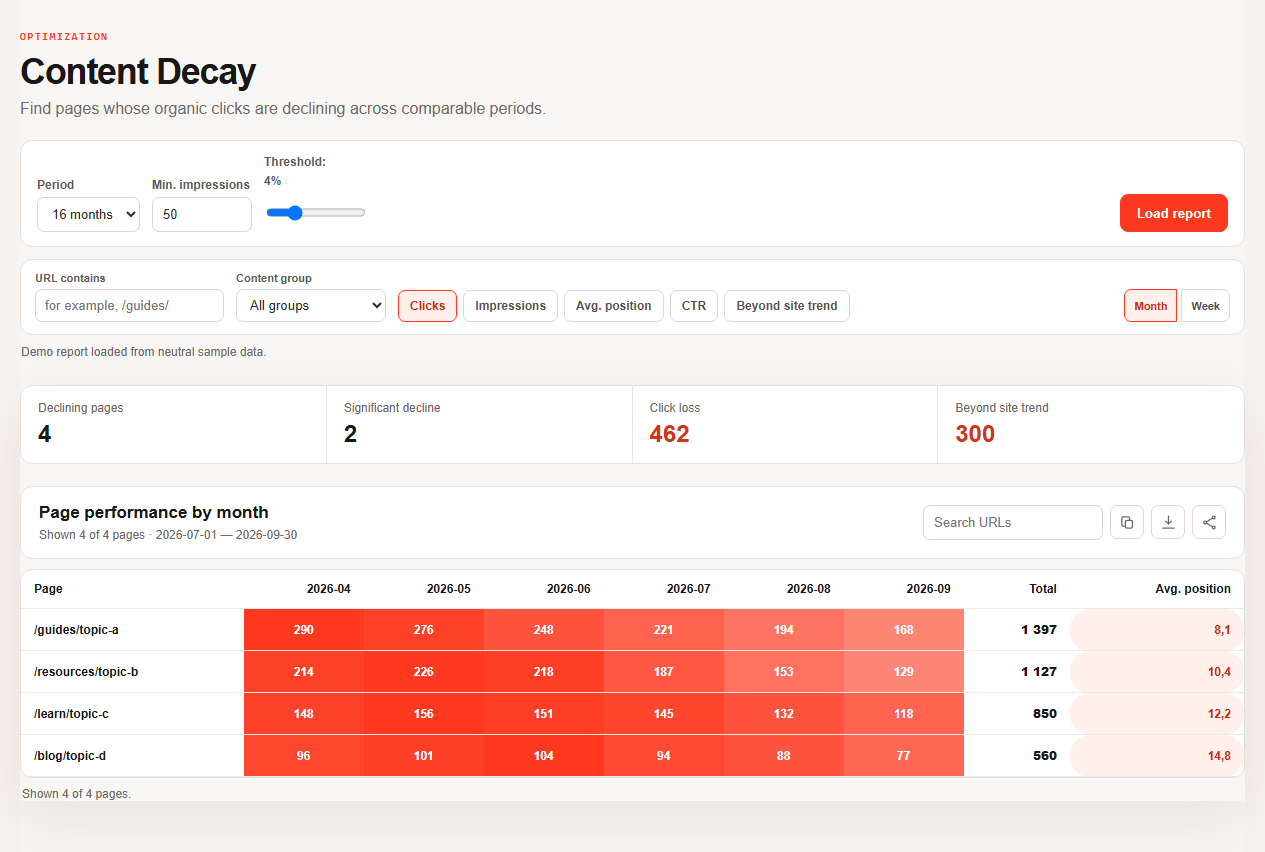
What content decay is
“Content decay” is a diagnosis, not a Google metric. It describes a sustained decline in clicks on an existing page across comparable periods. Search Console reports clicks, impressions, CTR and average position; it does not label a page as decayed and does not tell you why a decline happened (Performance report).
The same drop can come from shrinking demand, from a page-level problem or from something site-wide, and each needs a different action. The point of this playbook is to separate them before anyone edits a word.
Four gates before changing content
A declining row becomes an editing task only after these checks. The thresholds belong to your property; they are not Google rules.
- Comparability. Equal complete periods, the same search type and stable country and device filters.
- Demand. Impressions and Google Trends show whether people are searching less. Google lists seasonality and changing interests as causes of a drop and suggests checking the top queries in Trends (debugging Search traffic drops).
- Distribution. Query mix, CTR and position are inspected below the page total.
- Page state. Indexing, canonical choice, intent overlap and technical changes are ruled in or out.
The eight-step decay check
Use enough history to see seasonality, but compare two equal complete windows (advanced filtering and comparison).
- Load the long view. Open Content Decay and use the heatmap to find a sustained pattern instead of reacting to one noisy week.
- Lock comparable filters. Same search type, country, device and page scope; leave out preliminary days.
- Prioritize observed loss. Sort by absolute click loss, then apply an impression floor suited to this property. A universal click threshold would hide useful small-site evidence.
- Open one page and its queries. Is the decline broad or driven by a few queries? Read clicks, impressions, CTR and position together (common Performance tasks).
- Rule out external and site-wide causes. Compare site-wide patterns, seasonality and Google Trends. A demand drop or a technical event is not stale copy.
- Choose refresh, consolidate, fix or leave (table below).
- Make one bounded update. Record the exact sections, title promise or internal links changed; keep the URL when it still represents the intent; save the launch date and baseline.
- Measure without a deadline. After enough new impressions, compare the same filters and complete windows.
Splitting a 420-click loss into two parts
A neutral page, Web search, the same country and device, two complete 90-day periods. The split holds the previous CTR constant; it describes the observed gap and does not predict recovery.
| Period | Clicks | Impressions | CTR | Position |
|---|---|---|---|---|
| Previous 90 days | 1,200 | 40,000 | 3.00% | 7.2 |
| Recent 90 days | 780 | 36,000 | 2.17% | 8.1 |
Demand component = (40,000 − 36,000) × 3.00% = 120 clicks
Performance component = 36,000 × 3.00% − 780 = 300 clicks
Observed loss = 120 + 300 = 420 clicks (−35%). About 120 click-equivalents align with fewer impressions; the remaining 300 align with lower CTR, position or query mix. These associations are a triage signal, not a proven cause.
Choose the action from the evidence
| Action | When |
|---|---|
| Refresh | intent and URL ownership are stable and a specific information or result-promise gap is visible |
| Consolidate | two pages serve the same intent and split signals; decide the primary destination first. Redirects and rel="canonical" are strong canonicalization signals, a sitemap is a weak one (consolidate duplicate URLs) |
| Fix technical | indexability, canonical selection, template changes or a site-wide loss explain the pattern better |
| Leave alone | demand contracted, the topic is obsolete or the sample is too small to support an intervention |
How to refresh a page properly
- Keep the URL when it still represents the intent, and keep what works.
- Change what the evidence points to: outdated facts, a missing section, a vague title promise, weak internal links.
- Show an honest date. Google looks at several factors to estimate when a page was published or significantly updated, recommends a user-visible date labelled like “Last updated”, and asks that visible and structured dates match and describe the page, not the events in it (byline dates).
- Request a recrawl once after a meaningful update. It can take a few days to a few weeks, there is a quota, repeated requests do not speed it up and inclusion is not guaranteed (ask Google to recrawl your URLs).
What the report cannot prove
- No causal verdict. Aggregate movement cannot prove that freshness, a competitor or one edit caused the decline.
- No complete query universe. Anonymized queries and the 1,000-row table limit mean visible rows may not reconcile with chart totals (dimensions and data groupings).
- No universal waiting period. Google says some changes show within hours and others take months; use evidence, not a fixed promise.
- No guaranteed recovery. The 120/300 split sizes an observed gap; it is not traffic available to win back.
The decay brief
For one page save: the filters, the two equal periods, the 120/300-style split, the four-gate diagnosis, one action, a review date and the observation that would reject your hypothesis. If impressions are too few on the review date, record “insufficient evidence” and change nothing.
Content decay, answered
What is content decay?
A sustained decline in clicks on an existing page across comparable periods. It is a diagnosis, not a Google metric.
How do I find decaying pages in Search Console?
Compare two equal complete periods in the Performance report, sort pages by absolute click loss and check the queries below each page.
Is every decline a reason to refresh?
No. Check demand, seasonality, site-wide changes and indexing first.
How long until a refresh shows results?
From hours to several months; compare equal periods rather than waiting for a fixed number of weeks.
Should I delete a decayed page?
Only when demand is gone or the page overlaps a better one; consolidate with a redirect when a replacement exists.
What to read next
Continue with the playbooks on title tags and cannibalization, or go back to striking-distance queries and week 1 quick wins.