Title tags: how to write them and rewrite them with Search Console data
The title tag is one input to the title link Google shows in results. This playbook explains what Google documents about it, how to find pages whose title promise is weak, and how to test one honest rewrite with Search Console data.
✓ Verified against Google documentation · 4 October 2026
What a title tag is and what Google does with it
The title tag is the <title> element in a page’s HTML. Google uses it as one input when it builds the title link, the clickable headline of a search result. Title links are often the primary piece of information people use to decide which result to click (influence your title links).
The generation of title links is completely automated. Google Search uses several sources: the <title> element, the main visual title on the page, heading elements such as <h1>, og:title meta tags, other large and prominent text, other text on the page and anchor text. So what you write is a strong input, not a guarantee of what will be shown.
How to write a good title: Google’s own rules
- Give every page a title in the
<title>element. - Be descriptive and concise. Avoid vague descriptors such as “Home” or “Profile”, and avoid unnecessarily long or verbose text. There is no limit on how long a title element can be; the title link is truncated as needed, typically to fit the device width.
- Do not stuff keywords. A string of repeated terms does not help users and can look spammy.
- Do not repeat boilerplate. Give each page distinct text that describes its content; titling every page the same makes pages indistinguishable.
- Brand concisely. Put just the site name at the beginning or end, separated by a delimiter such as a hyphen, colon or pipe.
- Make the main title obvious. Make it distinctive and most prominent on the page, for example in the first visible
<h1>, so headings of equal weight do not confuse Google. - Match the language and writing system of the page’s primary content; otherwise Google may choose different text.
Source for all seven rules: Google’s title link documentation. Notice what is not there: no fixed character count, no year, no formula.
Four gates before you rewrite a title
A query missing from the title is a clue, not a verdict: a relevant page can rank for a query it does not repeat. Change a title only when all four checks support the same page–query pair. The thresholds are editorial choices for your property, not Google rules.
- Evidence. The pair has enough impressions to evaluate inside this property.
- Intent. The query describes what the page actually satisfies rather than a different task that needs its own page.
- Search appearance. Inspect the current result: Google may show a title link built from sources beyond the title element.
- Page alignment. The H1 and main content truthfully deliver the promise you plan to put in the title.
Measure the CTR gap before editing
A neutral page–query pair, Web search, the same country and device, two complete 28-day windows (advanced filtering and comparison). Position is nearly stable; the arithmetic describes the current gap and is not a traffic forecast.
| Period | Clicks | Impressions | CTR | Position |
|---|---|---|---|---|
| Previous 28 days | 54 | 3,000 | 1.80% | 6.9 |
| Recent 28 days | 51 | 3,400 | 1.50% | 6.8 |
Baseline clicks at old CTR = 3,400 × 1.80% = 61.2 ≈ 61
Observed gap = 61 − 51 = 10 clicks
The page received about 10 fewer clicks than its own earlier CTR would imply at the recent impression volume. This supports inspection; it does not prove the title caused the gap and does not promise that 10 clicks are recoverable.
Turn the evidence into one honest promise
| Item | Example |
|---|---|
| Current title | Resources | Example |
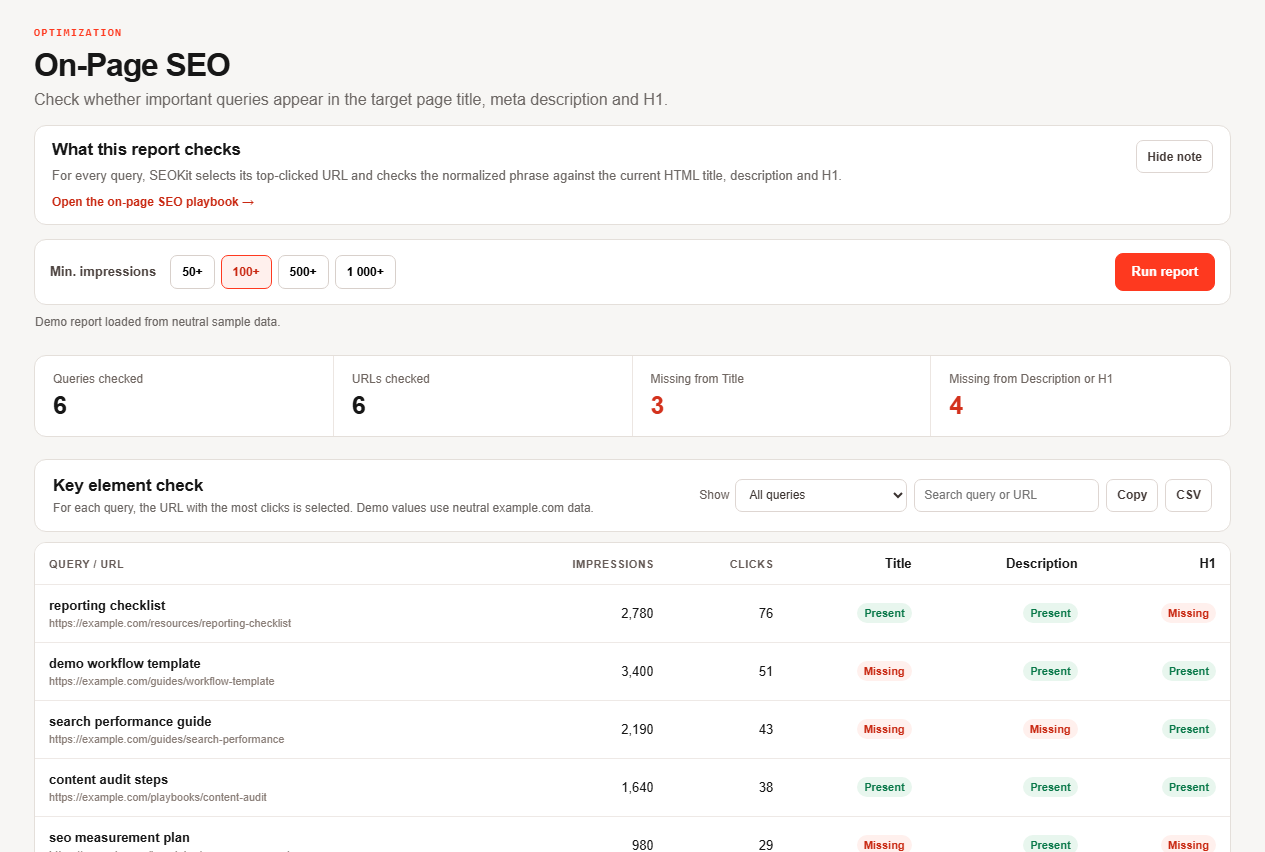
| Observed query | demo workflow template |
| Candidate title | Demo Workflow Template: Step-by-Step | Example |
| H1 check | Build a demo workflow — aligned with the promise |
The candidate leads with the useful topic, adds a truthful differentiator and keeps the brand short at the end. It does not repeat the phrase, and the H1 tells the same story in more conversational words.
The eight-step title test
- Load candidates. Open On-Page SEO and sort high-impression rows where the query is absent from the title.
- Open one pair. In Performance filter the exact page and query, keeping search type, country, device and dates (Performance report).
- Check the query mix. The query should represent the page intent, not one incidental cluster of impressions.
- Inspect the live result. Compare the title element with the title link Google shows and the visible H1.
- Draft concise options. Lead with the useful topic, add a truthful differentiator, keep the brand only if it helps recognition. Do not stuff variants.
- Align the page. Change the H1 or copy only if the page must deliver the new promise; otherwise revise the draft.
- Publish and annotate. One bounded change: record the old and new title, URL, launch date and baseline.
- Measure like for like. After enough new impressions, compare equal complete windows for the same pair. A recrawl request can take days to weeks, has a quota and guarantees neither timing nor inclusion (ask Google to recrawl).
Choose the right action
| Action | When |
|---|---|
| Rewrite the title | intent and page are aligned, but the title promise is vague or misses the dominant need |
| Update the page first | the query fits, but the content or H1 does not yet fulfil the proposed promise |
| Create or separate a page | the query is a distinct intent the current page should not absorb |
| Leave unchanged | the sample is thin, the displayed title already works or the query is incidental |
What this method cannot prove
- No automatic defect. A query missing verbatim from the title can still be served by a relevant page.
- No guaranteed title link. Google selects title links automatically and may use other page text.
- No fixed length rule. Google documents no title element length limit; truncation varies by device width.
- No promised uplift. CTR also varies with position, result features, brand, intent and query mix, and Google says some changes show within hours while others take months (SEO starter guide).
- Rows are not every query. Anonymized queries are omitted and the table is limited to 1,000 rows (dimensions and data groupings).
Title tags, answered
What is a title tag?
The <title> element of a page; one of the inputs Google uses to build the title link shown in search results.
How long should a title tag be?
Google documents no limit. Be descriptive and concise; the title link is truncated to fit the device width.
Does Google rewrite titles?
Title links are generated automatically from several sources, so the displayed text can differ from your title element.
Should the title match the H1?
They should tell the same story. Make the main title clear, for example in the first visible H1.
How soon will a new title show an effect?
From hours to several months; compare equal complete windows rather than waiting a fixed time.
What to read next
Continue with the cannibalization playbook, or go back to content decay and striking-distance queries.