Keyword cannibalization: how to find and fix it with Search Console
Keyword cannibalization is several URLs of one site appearing for the same query. This playbook shows how to separate real ownership conflicts from legitimate overlap, choose between differentiating, merging with a redirect and canonicalizing, and avoid the mistakes Google warns about.
✓ Verified against Google documentation · 4 October 2026
What keyword cannibalization is
“Keyword cannibalization” is an industry label, not a Google term. It describes several URLs of one site that appear for the same query and seem to compete with each other. Search Console can show you which pages appeared for a query, but that is evidence to inspect, not a diagnosis: the URLs may be legitimate siblings, historical variants or a real ownership conflict.
Two details change how you read the data. Most performance data is assigned to the page’s canonical URL, not to a duplicate (dimensions and data groupings). And Google itself clusters pages with very similar content and chooses one as the canonical, based on signals such as HTTPS, redirects, sitemap inclusion and rel="canonical"; its choice can differ from the site’s preference (what is canonicalization).
Four gates before you choose a fix
The report creates candidates. A cluster becomes an action only after all four checks.
- Meaningful share. A second URL has enough impressions relative to the leader to be worth inspecting. The threshold belongs to this property.
- Same intent. Both pages promise the same task and would satisfy the same searcher. Similar wording alone is not enough.
- Ownership instability. The preferred URL is unclear or the leader changes across comparable windows; one incidental appearance is not enough.
- Technical state. Indexability, redirects, the declared canonical, the Google-selected canonical, hreflang and internal links are checked.
A shortlist without turning it into a rule
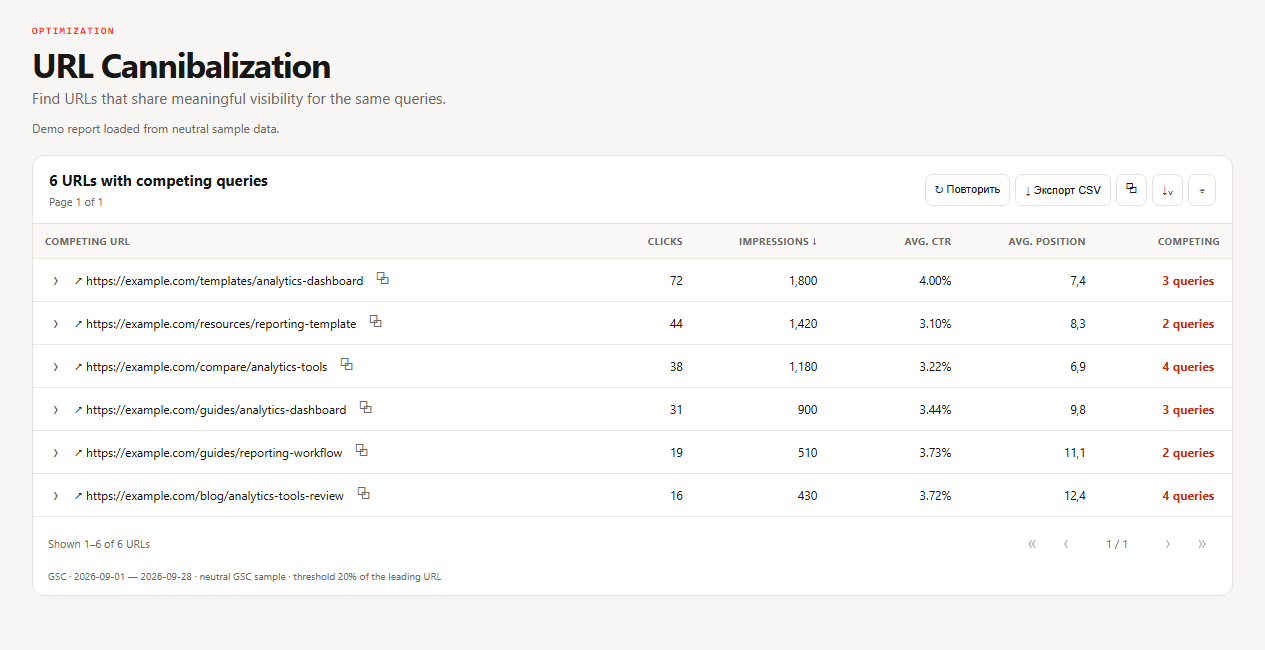
A neutral query, Web search, the same country and device, one complete 28-day window (advanced filtering and comparison). The 20%-of-leader cutoff only decides which rows deserve manual review.
| URL | Clicks | Impressions | Share | Position |
|---|---|---|---|---|
| /templates/analytics-dashboard | 72 | 1,800 | 60% | 7.4 |
| /guides/analytics-dashboard | 31 | 900 | 30% | 9.8 |
| /archive/analytics-dashboard | 4 | 300 | 10% | 18.2 |
Review cutoff = 1,800 × 20% = 360 impressions
The first two URLs qualify for inspection; the 300-impression row stays visible but below the shortlist. The calculation does not prove cannibalization: the template and the guide may serve different intents. The archived URL is still checked technically.
The eight-step ownership test
Work on one cluster at a time and keep the original export.
- Load meaningful overlap. Open Cannibalization, choose a complete period and a property-relative threshold.
- Open the query cluster. Inspect every returned URL with the same filters: clicks, impressions, CTR and position.
- Check the page promise. Compare title, H1, main content, format and audience. Do the pages satisfy the same intent?
- Check leader stability. Repeat with a comparable window. A changing leader strengthens the conflict hypothesis; stable specialist pages may be legitimate.
- Inspect canonical state. Use URL Inspection and the HTML to compare the declared and Google-selected canonicals, indexability, redirects and hreflang.
- Name one owner. Choose the page that best completes the target task and can stay useful, not automatically the URL with the most clicks.
- Apply one remedy (table below) and update internal links consistently.
- Annotate and measure. Record the query, URLs, fix and date; compare the same query–page set after enough new impressions.
Choose the remedy from the purpose of the pages
| Remedy | When |
|---|---|
| Differentiate | both pages are useful but serve distinct intents: clarify the title, H1, copy and internal-link context |
| Merge and redirect permanently | the pages substantially duplicate one task and one URL can replace the other: merge unique value first, then redirect the retired URL. A redirect is a strong canonicalization signal |
| Canonicalize duplicates | equivalent variants must stay accessible: use one consistent rel="canonical" signal and link internally to the preferred URL |
| Leave alone | the overlap is expected, the intents differ, the sample is weak or the cluster is already canonicalized correctly |
What Google says not to do
- Do not use robots.txt for canonicalization. Google may still index disallowed URLs without their content (consolidate duplicate URLs).
- Do not use noindex to choose a canonical within one site. It completely blocks the page from Search;
rel="canonical"is the preferred solution. - Do not use the URL removal tool for canonicalization. It hides all versions of a URL.
- Do not send mixed signals. Do not name different canonical URLs for the same page with different techniques (troubleshoot canonicalization).
- Link to the canonical URL from inside your site, not to a duplicate.
- Do not change ten clusters at once. One change at a time keeps the result attributable.
What the report cannot prove
- No automatic competition. Two URLs for one query do not show that Google is confused or that either page would rank higher alone.
- Incomplete query set. Anonymized queries and the 1,000-row limit mean the visible table is not every query.
- Canonical aggregation. Data is credited to the canonical URL, so duplicates can be hidden or merged in reporting.
- No guaranteed lift. A redirect or canonical is a signal and a site change, not a promised gain. Google says some changes show within hours and others take months (SEO starter guide).
The ownership decision
For one cluster save: the filters, the leader cutoff, every URL, the intent verdict, the declared and Google-selected canonical, the chosen owner, the remedy, the baseline, a review date and the observation that would reverse the decision. If impressions are too few on the review date, record “insufficient evidence” and change nothing.
Keyword cannibalization, answered
What is keyword cannibalization?
Several URLs of one site appearing for the same query and seeming to compete. It is an industry label, not a Google term.
Is it always a problem?
No. Legitimate sibling pages and different intents are normal; check intent, canonical state and stability first.
How do I find it in Search Console?
Filter the Performance report by a query and open the Pages tab; SEOKit’s cannibalization report shortlists such clusters.
Should I use a redirect or a canonical?
Redirect when one page replaces the other; use rel=canonical when equivalent variants must stay accessible.
How long until the fix shows?
From hours to several months; compare the same query–page set over equal windows.
What to read next
Continue with the CTR recovery playbook, or go back to title tags and week 1 quick wins.