Google SERP Checker and Analyzer
A free SERP Analyzer Tool for any keyword: detect search intent, SERP features, dominant content formats and get page recommendations.
How to use
What Is a SERP Analyzer — and Why Does Every SEO Need One?
A SERP analyzer examines the top Google results for any keyword and extracts the patterns that define what it takes to rank. Instead of manually opening ten tabs and guessing what competitors have in common, you get a structured breakdown of search intent, active SERP features, dominant content formats, and a prioritized list of recommendations — all in seconds.
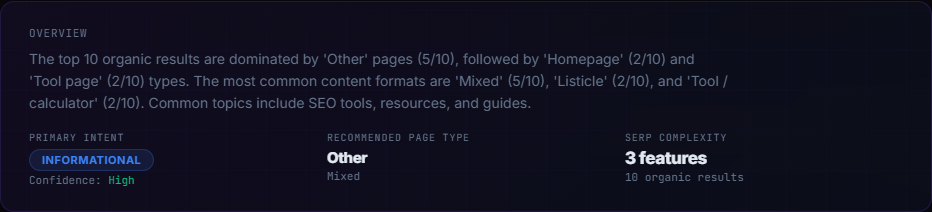
Overview panel: primary intent, recommended page type, and SERP complexity at a glance.
Search Intent: the Foundation of Any Ranking Strategy
Google's algorithm is designed to serve the most relevant result for a given query. That relevance is measured against search intent — the underlying goal of the person typing the keyword. There are four canonical intent types:
- Informational — the user wants to learn something ("what is SERP analysis").
- Navigational — the user looks for a specific brand or page ("Ahrefs login").
- Commercial — the user compares options before buying ("best SERP tools 2025").
- Transactional — the user is ready to act ("buy Semrush subscription").
Our analyzer reads the titles, snippets, and page types of the top-10 organic results and classifies the dominant intent automatically. Matching your content's structure and angle to that intent is the single highest-leverage SEO action you can take.
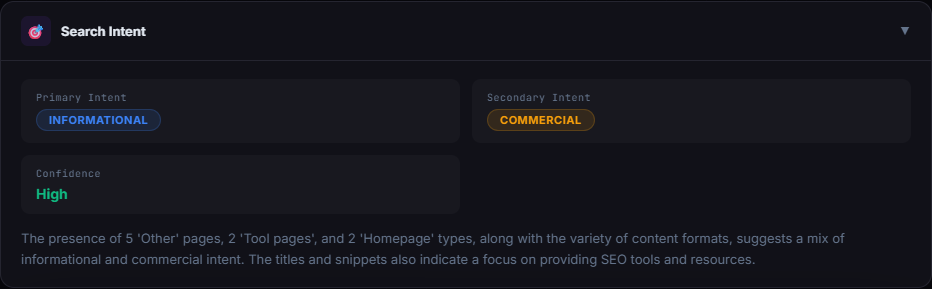
The Search Intent panel detects primary and secondary intent with a confidence rating.
SERP Features: Know What's Competing for Clicks
Modern SERPs are far more than ten blue links. SERP features — Featured Snippets, People Also Ask boxes, Video carousels, Knowledge Graphs, Shopping ads, Local Packs — can capture 30–60 % of clicks before a user even reaches the organic results. Knowing which features are active for your target keyword lets you:
- Decide whether to optimize for a Featured Snippet (concise definition + list) or a Video result (embed a YouTube explainer).
- Use FAQ schema to appear in People Also Ask and earn additional SERP real estate.
- Assess true click-through competition and adjust your CTR estimates accordingly.
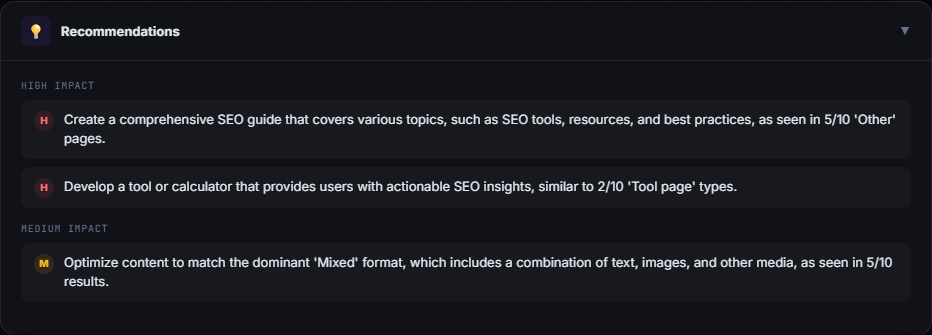
Recommendations are sorted by impact — High, Medium, Low — so you can act on what matters most first.
Content Patterns: Reverse-Engineer What Works
Winning pages don't succeed by accident. The analyzer scans the top results and surfaces the dominant page types (article, tool, listicle, product page…) and content formats (guide, comparison, FAQ, tutorial…) that Google already rewards for your keyword. If 7 of 10 results are long-form guides with numbered lists and FAQ sections, that's a clear signal — not a suggestion.
The Content Blueprint feature goes one step further: it generates a recommended heading structure, word-count target, must-have sections (intro, FAQ, comparison table…), and suggested internal/external link patterns — all derived from what's currently ranking.
SERP Gap Analyzer: See Exactly Where Your Page Falls Short
Paste your URL into the optional field and the tool fetches your live page, extracts title, H1, word count, and structural signals (lists, tables, FAQ), then compares them to the SERP benchmark. The Gap Analysis panel highlights:
- Priority Actions — critical structural or topical fixes (missing H2 hierarchy, no FAQ block…).
- Missing Topics — subjects covered by top competitors that your page doesn't mention.
- Missing Sections — content blocks (comparison table, resource list, tool directory…) present on competing pages but absent on yours.
- Structural Issues — technical content problems like thin word count or absent schema signals.
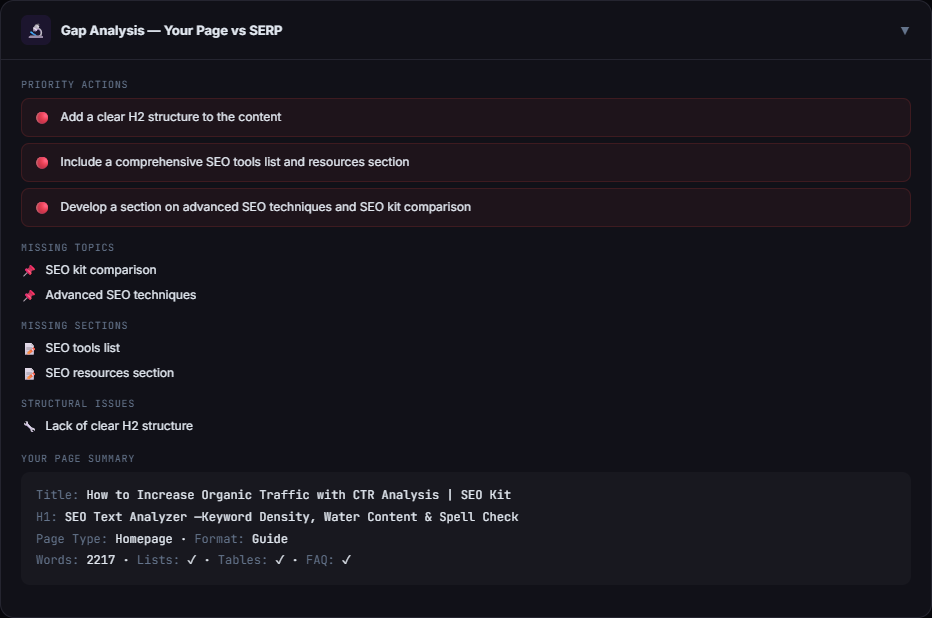
Gap Analysis compares your live page against the SERP benchmark and surfaces actionable fixes.
How to Use the SERP Analyzer — Step by Step
- Enter your target keyword. Use the exact phrase you want to rank for — the tool analyzes the live Google SERP for that query.
- Select country, language, and device. SERP composition varies significantly by region and device type. Desktop and mobile results can have completely different feature sets.
- Add your URL (optional). For gap analysis, paste the page you want to improve. Leave blank to analyze the SERP without comparing.
- Click Analyze. The tool queries Serper.dev for fresh SERP data, classifies patterns, and runs an AI layer for intent reasoning and recommendations.
- Read the results top to bottom. Start with Intent → SERP Features → Content Patterns → Recommendations → Gap Analysis. Each section builds on the previous.
- Act on High-Impact items first. Recommendations are ranked by estimated impact. Structural fixes and intent alignment deliver the fastest ranking improvements.
Frequently Asked Questions
Practical SERP analysis workflow
If eight of the top ten results are free tools and two are articles, publishing another overview article probably misses the dominant intent. Choose the right page type first, compare your structure with the leaders, and only then expand the copy.
Confirm intent with the Search Intent Analyzer, compare competing layouts with Competitor SERP Structure and audit your URL with the Page Analyzer.
Next step