🤖 AI SEO

AI Overview Analyzer

Why is Google citing competitors instead of your page? Paste an AI Overview, enter your domain and page content — get entity gaps, missing claims and a ready content brief.

Analyze an AI Overview

Best: Right-click the AIO block in Google → Inspect → right-click the highlighted element → Copy → Copy element, then paste here.
Quick: Simply select and copy the AI Overview text.
🧱
AIO Block Format
The content structure Google chose for this query
🏷️
Entity Map
What Google recognises in this AIO — brands, structure, and topic framing
Brand / Tool Sections
How Google frames this topic — not brands, but useful for content structure
Phrase Freq
💬
Answer Gap
Key claims from the AI Overview vs. your page coverage
📝
Content Brief
H2+H3 structure and FAQ derived from this AI Overview

Suggested H2 / H3 structure

FAQ questions to add

    How to use the AI Overview Analyzer

    Two inputs unlock the full analysis: the AI Overview HTML from Google, and your page content. Here's how to get both in under a minute.

    1
    Find an AI Overview on Google
    Search for your target keyword. If a blue-shaded AI Overview block appears above organic results — you're ready. Open Chrome DevTools: right-click anywhere on the AIO block → Inspect. The highlighted element in the Elements panel is the AIO container.
    💡 Best mode Right-click the highlighted <div> in DevTools → Copy → Copy element. This captures the full HTML with source links — needed for citation detection.
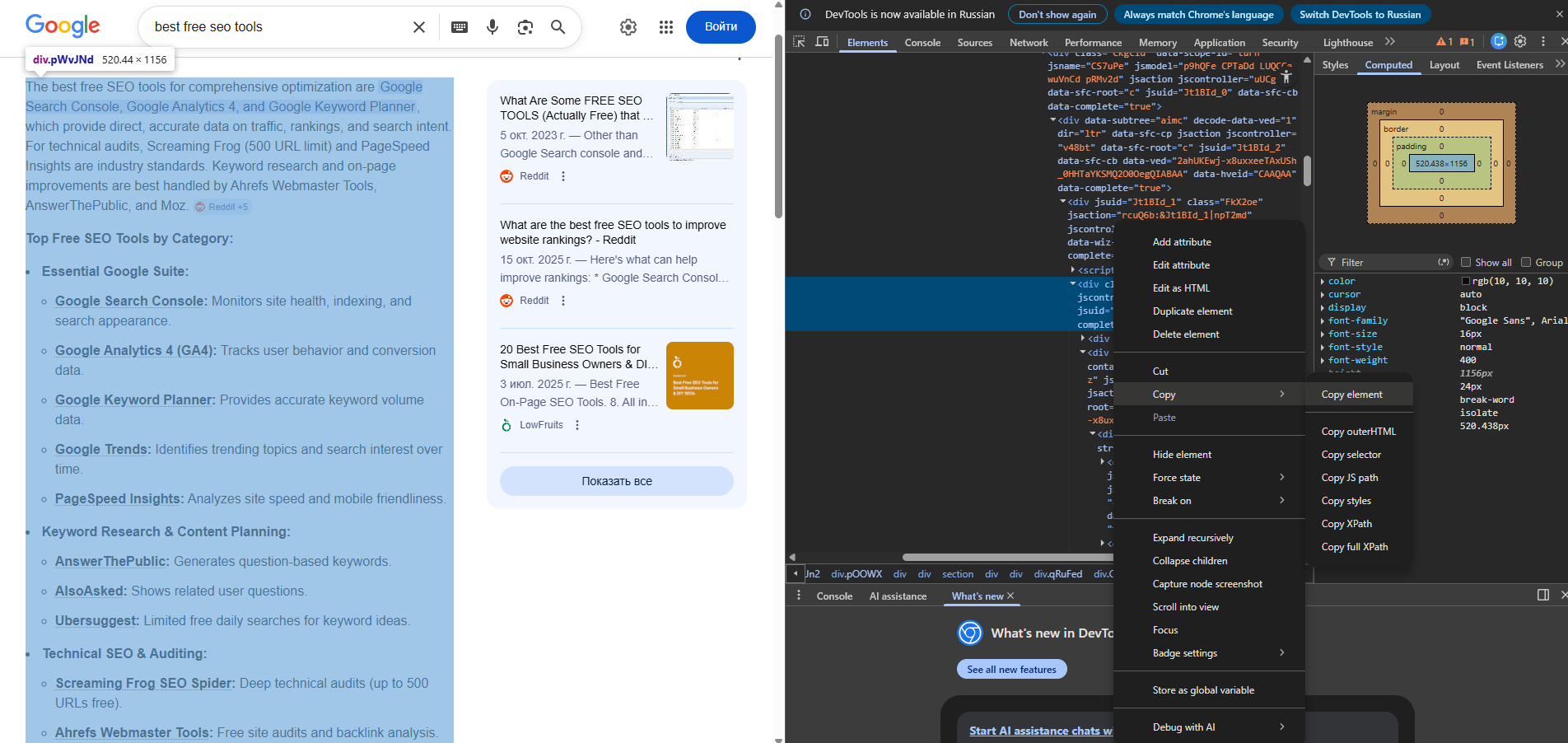
    Google AI Overview with Chrome DevTools open showing Copy element option
    2
    Fill in the form and run the analysis
    Paste the copied HTML into the AI Overview Content field. Enter your search query (the keyword you searched) and your domain (e.g. example.com) to check if your site is cited. For full gap analysis, also paste your page content — this unlocks entity gaps, missing claims, Match Score and the Content Brief.
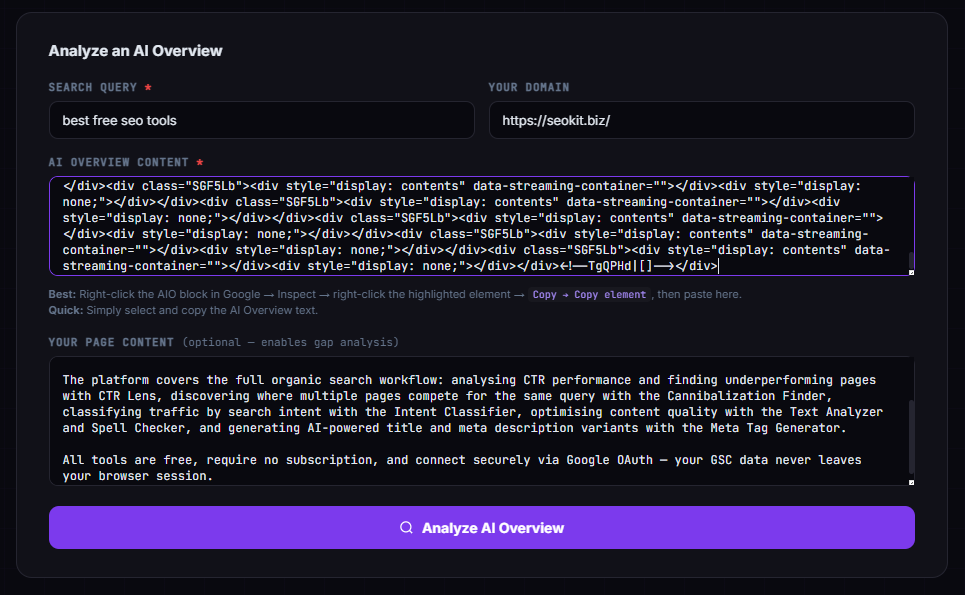
    ⚡ Quick mode No DevTools? Just select and copy the visible AIO text. You'll still get entity extraction, block format analysis and Content Brief — just without source detection.
    AI Overview Analyzer input form with AIO HTML pasted
    3
    Interpret the results
    After clicking Analyze AI Overview, seven cards appear. Start with Match Score to understand your overall AEO readiness, then check Entity Map → Brands & Tools to see which named tools you're missing, and finish with the Content Brief to get a ready H2/H3 structure you can give directly to a writer.
    Match Score → your AEO readiness Entity Map → missing tools Why Not Cited → top 3 reasons Content Brief → H2/H3 for your writer

    What is an AI Overview and why does it matter for SEO?

    Google AI Overviews (formerly Search Generative Experience) are AI-generated answer summaries that appear above organic results for a growing share of queries — particularly informational and research-intent searches. When an AI Overview is present, it absorbs a significant portion of clicks that would otherwise go to the top organic positions.

    The pages Google cites in AI Overviews receive referral clicks via the citation links — but pages that don't appear lose both direct clicks and the brand authority that comes with being cited. Tracking whether your pages appear in AI Overviews for your target queries has become an essential part of modern SEO monitoring.

    More importantly, understanding why Google cites a competitor instead of your page — and what specific content, structure or entities their page has that yours lacks — is the actionable insight that drives content improvements. That's exactly what this tool surfaces.

    Frequently Asked Questions

    Why paste HTML instead of just text?
    HTML mode (using Copy element from browser DevTools) gives the tool access to the source links inside the AI Overview — the actual URLs Google is citing. In text mode, source detection is not available because URLs are stripped when you copy visible text. HTML mode also preserves the list structure, which makes block type detection more accurate.
    Does this tool make Google show my page in AI Overviews?
    No tool can guarantee AI Overview inclusion — Google's selection algorithm is not public and changes frequently. What this tool does is identify the specific content coverage gaps between your page and the content Google chose to cite, so you can make targeted improvements that align with the patterns observed in the actual AI Overview for your query.
    What is AEO and how is it different from SEO?
    AEO (Answer Engine Optimization) is the practice of structuring content to be selected and cited by AI answer systems — Google AI Overviews, ChatGPT, Perplexity, and similar engines. It overlaps heavily with SEO (both reward comprehensive, well-structured, authoritative content) but adds specific emphasis on: direct concise answers under clear headings, entity coverage (mentioning the right named concepts), structured formats (numbered lists, FAQ, step-by-step), and factual precision with verifiable claims.
    Why isn't my domain detected as present even though I appear in the AIO?
    This can happen in text mode (where no URLs exist to parse) or if your page is cited via a subdomain or URL path that doesn't match the domain you entered. Try entering your full domain without "www" (e.g. "example.com") and ensure you're using HTML mode with Copy element from DevTools for accurate source detection.
    What does the Content Brief section contain?
    The Content Brief generates suggested H2 headings, FAQ questions and specific content additions based on the AI Overview format, detected entities and identified gaps. It's designed to be handed directly to a writer or used as a checklist when editing your existing page. The suggestions are tied to the specific query and AIO content you analyzed — not generic advice.